Basic TCP/IP Networking
By Stephen Bucaro
In this article, I'm going to describe how a network works. I am NOT not going to
load you down with the details about how the hardware works, or how IP addresses are
formed, or about the seven layers of the TCP/IP protocol. Instead, I'm just going to
describe what happens when you start your client computer. How it gets access to the network.
Every system on a network, be it a computer, printer, or some other device, needs
a unique address by which it can be identified. With TCP/IP protocol, this address is
a 32 bit number described using four digits, each digit from 0 to 255 is separated
by dots. Below is an example of an IP address.
169.254.0.0
When a client computer first starts, it needs an IP address. An administrator
could manually configure the system with a static IP address. But with a large
network, manually assigning a static IP address to every system on the network would
be a lot of work.
A system can be configured to obtain an IP address automatically. In that case it
would request an IP address from a Dynamic Host Configuration Protocol (DHCP) server
on the network. So when the system first starts, it looks for a DHCP server.
In order to use dynamic IP addressing, you need to have a DHCP server on the network
from which clients can obtain IP addresses. When an administrator sets up a DHCP server
he must configure the range of addresses that can be leased to clients on the network.
This range of addresses is called the "scope".
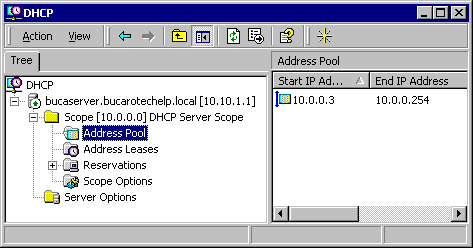
To view the scope of your DHCP server, log on, as Administrator, to the server
running DHCP. Then select Start | Programs | Administrative Tools | DHCP to open the
"DHCP" management window. Under the name of the server, click on the "+" next to
"Scope" and then click on "Address Pool" to see the range of IP addresses in the scope.
An administrator could manually configure the client computer with the IP address
of a DHCP server. But a large network might have several DHCP servers, in case one goes
down, the systems on the network could still get IP addresses from a different DHCP server.
A client computer can be configured to obtain a DHCP server's IP address automatically.
| 

 About BTH
 User Agreement
 Privacy
 Site Map
 Contact
 News Feeds


 RSS Feed
 Follow @Stephen Bucaro
 Basics and Certification


