TCP/IP Utilities
By Stephen Bucaro
TCP/IP comes with a set of command line utilities that a network technician can
use to manage and troubleshoot a network.
PING (Packet Internet Groper)
PING is used to test the ability of two hosts on a network to communicate. To
test the connection, type in PING followed by the name or IP address of the other
host. If the host can be reached, PING will report the time required to receive a
reply from the host. If the host cannot be reached, PING will provide a report
containing some information that may indicate the cause of the problem.
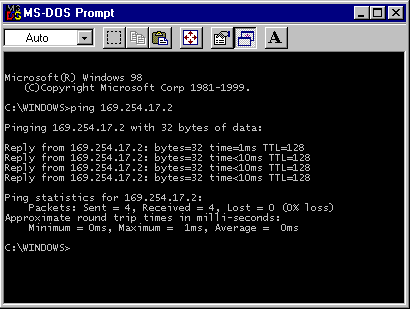
Windows computers will transmit four PING messages. If the host cannot be reached,
some operating systems will continue to send packets until to cancel the PING
command by pressing the Control-C key combination.
TRACERT (Trace Route)
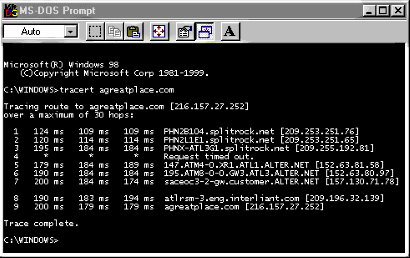
TRACERT is used to trace the route between two hosts on a network. To trace a
route, type in TRACERT followed by the name or IP address of the other host. TRACERT
will list each router it encountered along the path between a computer and the
destination host. It also reports the number of hops between a computer and
the destination.
NBTSTAT (NetBIOS Test Status)
NBTSTAT is used to troubleshoot NetBIOS names when you're working with NetBIOS
over TCP/IP. The NetBIOS name cache lists the NetBIOS names and related IP
addresses. If your LMHOSTS file has entries with the #PRE tag, these entries are
preloaded into the NetBIOS cache, NetBIOS names and related IP addresses can also be
supplied by the WINS server. The NBTSTAT command can be used to display or correct
entries in the NetBIOS name cache.
NBTSTAT Switches
NBTSTAT [-a RemoteName] [-A IP address] [-c] [-n] [-r] [-R] [S] [interval]
RemoteName - Remote host machine name.
IP address - Dotted decimal representation of the IP address.
interval - Redisplays selected statistics, pausing interval seconds between each
display. Press Ctrl-C to stop redisplaying statistics.
| -a |
(Adapter status) |
Lists the remote machine's name table given its name |
| -A |
(Adapter status) |
Lists the remote machine's name table given its IP address |
| -c |
(cache) |
Lists the remote name cache including the IP addresses |
| -n |
(Names) |
Lists local NetBIOS names |
| -r |
(Resolved) |
Lists names resolved by broadcast and via WINS |
| -R |
(Reload) |
Purges and reloads the remote cache name table |
| -S |
(Sessions) |
Lists sessions table with the destination IP addresses |
| -s |
(Sessions) |
Lists sessions table converting destination TP addresses to host names via
the hosts file |
| 

 About BTH
 User Agreement
 Privacy
 Site Map
 Contact
 News Feeds


 RSS Feed
 Follow @Stephen Bucaro
 Basics and Certification


