Network Cabling and Components
By Stephen Bucaro
Although the power and sophistication of networking protocols and software is impressive,
a network could not operate without physical cable and components. Even a wireless network
needs physical components such as access points. And because wireless networks are subject
to problems like interference and lower security, cable will be the media of choice for many
networks for a long time to come.
Coaxial Cable
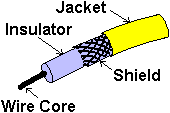
Coaxial Cable (coax) uses a solid wire in its core that is surrounded by a braided
metal shield. Insulating material separates the wire core and metal shield. The
central wire carries the electrical signal of the network data. The metal shield
protects the data from electrical interference. Early Ethernet networks used thick
RG-8 coaxial cable. This cable is referred to as Thicknet.
The IEEE created a system to specify network cabling. Thicknet is designated 10base5.
The 10 specifies the maximum speed in megabits per second at which the cable can
transfer data. “Base“ stands for baseband signal type. Baseband means it uses a digital
signal. The 5 specifies that 500 meters the maximum length of a cable segment.
Thicknet cable is very rigid, so the network computers and peripherals do not
connect directly to the cable. Each computer or other device, referred to as a node,
connects to the coax using a thinner drop cable. The Thicknet backbone
may run in the ceiling, with drop cables used to attach the individual computers.
Each drop cable is connected to the Thicknet backbone using a transceiver.
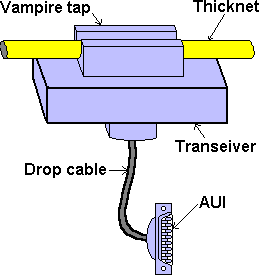
To attach a transceiver to the Thicknet cable requires a technician to cut a hole
through the cable shield and attach a “vampire tap“ which pierces the wire core of
the coaxial cable. The transceiver is then connected to the network interface card of
the computer using a cable with a DB-15 connecter called a DIX (Digital Intel Xerox)
or AUI (Attachment Unit Interface).
Transceivers may be placed no closer together than 2.5 meters and the transceiver
drop cable may be no longer than 50 meters. No more than 100 nodes may be connected
to the Thicknet segment.
Because of the high cost and difficulty of installation, Thicknet is rarely used
today. If it is already installed, or if there is high electrical interference in the
environment, it may still be used. Large networks may use Thicknet as a main backbone
cable to connect branch network segments.
10Base2
There are two types of coaxial cable. Besides the Thicknet just discussed, there is
Thinnet. The IEEE designation for Thinnet is 10Base2. You might think the "2" in 10Base2
means that the maximum length of a cable segment is 200 meters, but in actuality the
maximum length is only 185 meters.
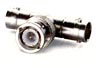 |
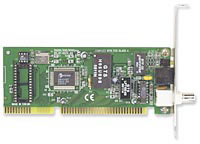
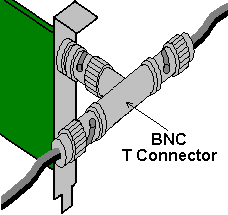
The Thinnet network cable does not use a drop cable, but instead connects
directly to a computer's NIC using a BNC "T" Connector.
|
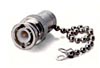 |
The electronic signal travels through the BNC T connectors to each node on the
bus and to the ends of the cable. A BNC terminator is connected to each end of
the cable to absorb the signal and prevent it from bouncing back.
|
 |
If a coax cable needs to be extended, two pieces of cable can be connected
together using a barrel connector. But if the entire length of the cable segment
is longer than 185 meters, the signal will attenuate (weaken) to the point of
becoming unreliable.
|
The signal is also attenuated slightly anytime it encounters a T connector or barrel
connector. For this reason a 10Base2 network may have a maximum of only 30 nodes on a
segment.
Almost all texts state that the acronym BNC stands for British
Navel Connector. This is an error. The central wire of the coaxial cable is
connected by means of a "bayonet" at the center of the connector. The coaxial
cable shield is connected by rotation of a metal nut with a locking grove. The
proper name for the BNC connector is Bayonet Nut Connector. |
| 

 About BTH
 User Agreement
 Privacy
 Site Map
 Contact
 News Feeds


 RSS Feed
 Follow @Stephen Bucaro
 Basics and Certification


