|
Create a Database Using Only Notepad
By Stephen Bucaro
You can create your own database using only Windows Motepad, or any ASCII text editor,
and use the database with Internet Explorer. Your database can be used as an address
book, recipe file, collection catalog, or any of a thousand uses. The example database
will contain all the different modes which can be set for a computers display.
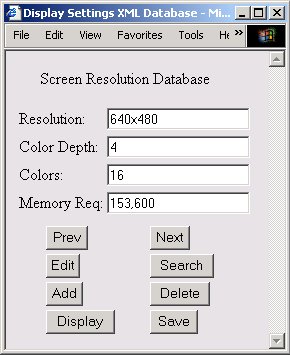
The database that I am describing will be a flat database. Whereas a relational
database contains several tables, along with relations between the tables,
a flat database contains only one table. The disadvantage of a flat database is that
sometimes data is repeated in the table.
The data for the database will be contained in an XML (Extensible Markup Language)
document which you will create with Notepad. Don't panic! You only need to enter one
record of the database using notepad. I have provided JavaScript code to perform the
database functions. This will be a good opportunity for you to learn the basics of XML.
A database is really just a table, each column in the table represents a field.
Each row in the table is a record. You need to determine what fields you will
need in your database.
The example database will contain all the different modes which can be set for a
computers display. Each record will contain the fields; resolution, number of color
bits, number of colors, and bytes of memory for a full screen. Shown below is one
record in the table.
640x480 4 16 153,600
| 

 About BTH
 User Agreement
 Privacy
 Site Map
 Contact
 News Feeds


 RSS Feed
 Follow @Stephen Bucaro
 Active Server Pages

