Visual Basic File Reading and Writing
By Stephen Bucaro
Writing Visual Basic programs is the old way of doing things. Today when I need to
write a quick utility to perform a task, I usually use Java Script. Java Script can
do almost anything. It's the programming language for the new millennium. Java Script
can run in a browser, but It's difficult (not impossible) to get a browser to save a
file to your hard disk. Java Script can run under Windows Scripting Host (WSH), but
WSH scripts prefer to time out quickly (you can configure them to run longer).
The problem is that my list server company (Topica) is charging a fortune to host
my newsletter. After considering all alternatives, I have decided the best thing
to do is administer the list myself on my own computer. The biggest problem with
administering the list myself is adding and deleting email addresses from the list.
Before you add an address to the list you have to make sure it's not already on the
list. Newsletter lists get a lot bounces and unsubscribes, so you need an easy way
to remove email addresses from the list.
Lets focus on the first task, adding email addresses to the list. You have a small
file containing a list of addresses to add, and a large file containing the email
addresses of all the sunscribers. You need to check each new address against every
address in the subscriber list. Then add to the subscriber list any new addresses
that are not already on the list. This is crucial function since I will be using a
low performance mail server to send my newsletter, I don't want any duplicate addresses.
Considering the previously mentioned limitations of Java Script, I choose to use
the next best programming language; Visual Basic. When I say Visual Basic is "best",
I don't mean it's powerful or fast. I mean it's easy to use. If you have Visual Basic
and you need a list utility, or want to learn Visual Basic file reading and writing,
you can follow along.
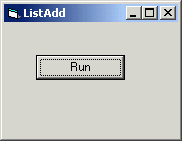
1. Open Visual Basic and create a new standard.exe project.
2. Change the name of the project from Project1 to ListAdd.
3. Change the name of the form from Form1 to frmMain.
4. Change the caption of the form from Form1 to ListAdd.
5. Add a command button to the form.
6. Change the name of the command button from Command1 to cmdRun.
7. Change the caption of the command button from Command1 to Run.
8. Click on the Run button to open the code window to the Sub cmdRun_click().
When the user clicks on the "Run" button, the program opens the file containing
a list of addresses to add. You can create that file with Windows Notepad or your
favorite plane ascii text editor. Lets name that file "addslist.txt" and type some
email addresses in it as shown below.
abcgo@domain.com
bcago@domain.net
cdego@domain.com
defgo@domain.com
efggo@domain.com
| 

 About BTH
 User Agreement
 Privacy
 Site Map
 Contact
 News Feeds


 RSS Feed
 Follow @Stephen Bucaro
 Active Server Pages


