Working With Folders in ASP
By Stephen Bucaro
When ASP is installed, the FileSystemObject is automatically installed with it.
The FileSystemObject allows you to work with drives, folders, and files on the server.
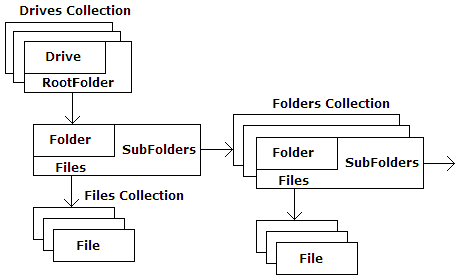
The FileSystemObject has a collection property called Drives. A collection
is a list or array of objects of the same type. Each drive in the drives collection
has a RootFolder object. Each Folder (including the RootFolder) has a subfolders
collection and a Files collection.
In certain instances, you may not be sure that a specific drive exists. In that
case, you should use the "DriveExists" method of the FileSystemObject before attempting
to access the drive. Example code for this is shown below.
<%
Dim objFS

Set objFS = _
  Server.CreateObject("Scripting.FileSystemObject")
If objFS.DriveExists("c:") = true then
  Response.Write("Drive Exists")
Else
  Response.Write("Drive Doesn't Exist")
End If
Set objFS = Nothing
%>
The drive that you are attempting to access might be a removable storage unit. In that
case, you should check the Drive objects IsReady property to make sure the removable
media is installed before attempting to access the drive. Example code for this is shown below.
<%
Dim objFS, Drv

Set objFS = _
  Server.CreateObject("Scripting.FileSystemObject")
Set Drv = objFS.GetDrive("c:")

If Drv.IsReady = True Then
  Response.Write("Drive Ready")
Else
  Response.Write("Drive Not Ready")
End If
Set Drv =  Nothing
Set objFS = Nothing
%>
| 

 About BTH
 User Agreement
 Privacy
 Site Map
 Contact
 News Feeds


 RSS Feed
 Follow @Stephen Bucaro
 Active Server Pages


