The IEEE 802.3 Ethernet Standards
By Stephen Bucaro
The Institute of Electrical and Electronics Engineers (IEEE). The IEEE sets up
committees to define industry standards. The IEEE 802 committee sets the standards
for networking. The IEEE subcommittee 802.3 sets the standard for Ethernet.
The IEEE created a system to specify network cabling. For example, in the designation
10base5, the 10 specifies the maximum speed in megabits per second at
which the cable can transfer data. Base stands for baseband signal type.
Baseband means it uses a digital signal. The 5 specifies that 500 meters the
maximum length of a cable segment.
10Base5 Thicknet
Speed: 10Mbps
Cable: thicknet coaxial
Maximum Length: 500 meters (1,640 feet)
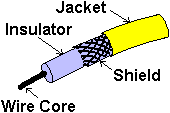
Coaxial Cable (coax) uses a solid wire in its core that is surrounded by a braided
metal shield. Insulating material separates the wire core and metal shield. The
central wire carries the electrical signal of the network data. The metal shield
protects the data from electrical interference. Early Ethernet networks used thick
RG-8 coaxial cable. This cable is referred to as Thicknet.
Thicknet cable is very rigid, so the network computers and peripherals do not
connect directly to the cable. Each computer or other device, referred to as a node,
connects to the coax using a thinner drop cable. The Thicknet backbone
may run in the ceiling, with drop cables used to attach the individual computers.
Each drop cable is connected to the Thicknet backbone using a transceiver.
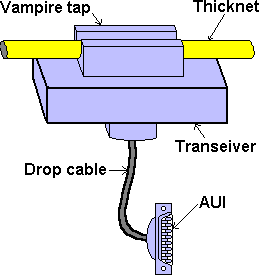
To attach a transceiver to the Thicknet cable requires a technician to cut a hole
through the cable shield and attach a vampire tap which pierces the wire core of
the coaxial cable. The transceiver is then connected to the network interface card
(NIC) of the computer using a cable with a DB-15 connecter called a DIX (Digital Intel
Xerox) or AUI (Attachment Unit Interface).
Transceivers may be placed no closer together than 2.5 meters and the transceiver
drop cable may be no longer than 50 meters. No more than 100 nodes may be connected
to the Thicknet segment.
Because of the high cost and difficulty of installation, Thicknet is rarely used
today. If it is already installed, or if there is high electrical interference in the
environment, it may still be used. Large networks may use Thicknet as a main backbone
cable to connect branch network segments.
| 

 About BTH
 User Agreement
 Privacy
 Site Map
 Contact
 News Feeds


 RSS Feed
 Follow @Stephen Bucaro
 Basics and Certification


