A basic network consists of two or more computers connected to each other by cable. Computers that are connected to the network can send messages or email back and forth, and can share data, applications, and peripherals.
Welcome to Bucaro TecHelp!

Welcome to Bucaro TecHelp!
Maintain Your Computer and Use it More Effectively
to Design a Web Site and Make Money on the Web

About Bucaro TecHelp About BTH User Agreement User Agreement Privacy Policy Privacy Site Map Site Map Contact Bucaro TecHelp Contact Advertise on Bucaro TecHelp Advertise Here RSS News Feeds News Feeds


Network Your Computers & Devices Step by Step

Network Your Computers & Devices Step by Step

This book teaches you how to network devices using the networking features of Windows 7 - even ones using different operating systems.

Easy numbered steps and screenshots offer opportunities to build skills. Learn from practice exercises geared to real-world objectives.

This book helps the novice setup a network for a variety of devices, and it even has some gems for the expert.

Click Here

Computer Networking Basics

The Function of a Network

A basic network consists of two or more computers connected to each other by cable. Computers that are connected to the network can send messages or email back and forth, and can share data, applications, and peripherals. A peripheral is a resource such as printer, modem, disk drive, or other hardware device. Before networks people shared data files on floppy disks and each computer needed its own printer.

LANs WANs and MANs

A network that connects together computers in a small area such as a single building or a floor within a building is called a local area network (LAN). A network that connects together computers over a large geographic area, such as different cities is called a wide area network (WAN).

Peer-to-Peer Network
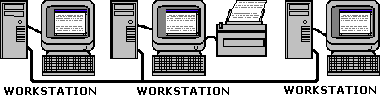
Peer-to-peer network

There are two types of networks, peer-to-peer and server based. A peer-to-peer network is also referred to as a workgroup. In a workgroup each user administers their own computer. Security is implemented by setting the sharing or by setting a password on a resource. There are typically fewer than ten computers in a peer-to-peer network. Although it may be less expensive to implement and administer than a server based network, the server based network has better security.

Client/Server Network
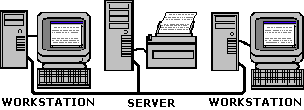
Client/Server Network

A server is a computer that is dedicated to performing one or more specialized functions in the network. File and print servers manage users access to files and printers. Application servers manage users access to applications. A server-based network allows central administration of network resources and security.

Computer Networking Sections

RSS Feed RSS Feed

Google Reader or Homepage
Add to My Yahoo!
Subscribe with Bloglines
Subscribe in NewsGator Online

Add to My AOL
Add to Technorati Favorites!

Networking Basics and Certification
Cellular WAN (Wide Area Network) or Mobile Broadband
Fiber Broadband Internet Service
Cable Broadband Internet Service
Satellite Broadband Internet Service
What You Need to Know About a Career as a Network Engineer
CompTIA Network+ Certification Exam Objectives
How to Study For and Pass the CompTIA Network+ Exam
CompTIA Network+ Video Mentor
CompTIA Network+ Self-Study Guide
Computer Networking Basics
Create a Peer-to-peer Network
What is DNS?
What is a Network Sniffer Used For?
What is a Proxy Server?
Network Know-How: An Essential Guide for the Accidental Administrator
Wireshark and Ethereal Network Protocol Analyzer Toolkit
Free eBook - Introduction to IP Addressing and Networking
Network+ Certification Exam Tutorial - DHCP And RARP
How And When To Use Virtual LANs (VLANs)
Wireless Networking Your PC
Home and Small Office Networking Guide
Cisco-Linksys Network Magic Pro
Turning Your Home into a Wi-Fi Network
Bluetooth Basics - Bluetooth Technology Tutorial
What is DSL and how can it benefit my home or small business?
Network Administrator Street Smarts
Servers - Racks, Blades and Towers
FREE Ebook - Network+ Certification Study Guide


[Site User Agreement] [Advertise on This site] [Search This Site] [Contact Form]
Copyright©2001-2011 Bucaro TecHelp 13771 N Fountain Hills Blvd Suite 114-248 Fountain Hills, AZ 85268