
Many small to medium sized organizations are wrestling with Windows server and paying excessive licensing fees when they don't need to. Sure, a server provides centralized security administration, but is it really more efficient? A peer-to-peer, or "workgroup" configuration, can often provide all the security and functionality required with less expense and less expertise to administrator. In fact, it's possible for each user to administer their own computer.
Microsoft claims that the workgroup configuration is most efficient for environments with ten or fewer workstations. Nonsense! I would bet that a peer-to-peer network could work with 100 or more workstations. However, networks with more than ten workstations should assign one individual as the administrator. In this case, rather than sit at a server, the administrator would be required to move from machine to machine. Who couldn't use a little exercise nowadays?
A peer-to-peer network lets you use most of the same features as a server network. Each computer can work as a client and a server to share files and hardware resources such as printers and CD-ROMs. Microsoft Internet Information Server (IIS) can be installed on a workstation and run Active Server Pages (ASP). However on a workstation, IIS installs as Personal Web Server (PWS), which is limited to 20 simultaneous connections. If you expect more than 20 connections, you should use Apache Server rather than IIS.
With a peer-to-peer network, the performance of a workstation may degrade while another workstation is accessing its resources. Place frequently accessed file shares and attach shared printers to Workstations of light users who will not be affected by frequent performance degradation. Or you could designate a chair-less workstation to act as a server.
A peer-to-peer configuration requires the same network hardware as a server configuration. Each computer needs a network adapter circuit, and a cable to connect to a hub. Hubs serve as centralized distribution points for the network. When a computer or cable fails, using a hub lets the rest of the network keep functioning.
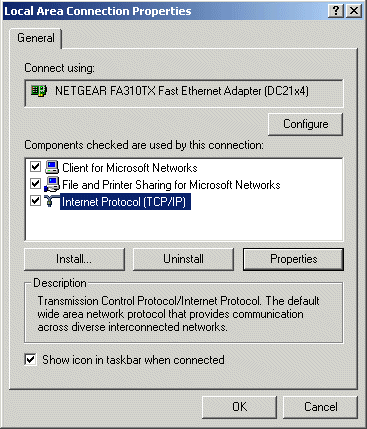
Once you have installed the network hardware, you need to install and configure the network protocols and services. When Windows 2000 initially detects a network adapter circuit, it creates a local area network (LAN) connection in the Network and Dial-up Connections folder. Internet Protocol (TCP/IP) is installed as the network protocol.
To make sure the required network protocols and services are installed.
1. login as administrator.
2. Select Start | Settings | Network and Dial-up Connections.
3. Right-click on "Local Area Connection".
4. Select "Properties" in the popup menu that appears.
5. In the "Local Area Connection Properties" dialog box, make sure the following are installed:
- Client for Microsoft Networks
- File and Printer Sharing for Microsoft Networks
- Internet Protocol (TCP/IP)
In order for computers on a network to contact each other, each must have a unique IP Address. If a computer is configured to obtain an IP address automatically, it will use Automatic Private IP Addressing (APIPA) to generate its own IP Address. If the generated address has already been used by another system, the computer generates and broadcasts another IP address.
I don't recommend using APIPA because it generates a lot of network traffic when computers are started, and it makes troubleshooting a network confusing because a workstation's IP Address is not fixed. I prefer to assign each workstation a static IP Address.
To assign a static IP Address.
1. login as administrator.
2. Start | Settings right-click on "Local Area Connection".
3. Select "Properties" in the popup menu.
4. In the "Components" List, highlight "Internet Protocol (TCI/IP)".
5. Click on the "Properties" button.
6. In the Internet Protocol (TCP/IP) Properties dialog box, select the radio button
next to "Use the following IP address." Then enter an IP address. For example, you
can assign the address 10.0.0.1 to the first workstation, 10.0.0.2 to the second
workstation, and so on.
7. Click on the "OK" button.
8. Restart the computer.
After the required network protocols and services have been installed, each computer must join the workgroup. To join a workgroup, each computer must be identified by a unique name. A computers name is created When Windows 2000 is initially installed. If each computer does not have a UNIQUE name, login as administrator and change the computer's name as required.
To join a computer to a workgroup.
1. login as administrator.
2. Start | Control Panel. Double-click on "System".
3. Select the "Network Identification" tab, click the "Properties" button.
4. In the "Member of" section, set the "Workgroup" radio button and enter
the name of the workgroup that you want the computer to join. Click on the "OK" button.
Note: A workgroup name must not be the same as the computer name. A workgroup name should have 15 characters or less, and be all uppercase. A workgroup name cannot contain any of the following characters: ; : " < > * + = \ | ?. The default workgroup name is WORKGROUP.
• With TCP/IP protocol the computer name can be up to 63 characters long, but 15 characters or less is safer in case the network has to communicate with computers without TCP/IP.
Note: If your computer was a member of a domain before you joined it to the workgroup, it will be disjoined from the domain and the computers domain account will be disabled. You have to reboot the computer before it can join the workgroup.
Each workstation must have a Local_user account configured for the individual who sits at that workstation. Each workstation must also have a Local_user account configured for each user who needs to access resources on that computer.
To Add a Local_user account to a workstation.
1. Login as Administrator.
2. Right-click on "MyComputer"
3. Select "Management" in the popup menu.
4. In the left panel of the "Computer Management" window, expand "Local Users and Groups".
5. Right-click on the "Users" folder and select "New User..." in the Popup menu.
6. In the "New User" dialog box enter the User name and Password for the account.
To access resources on a different workstation over the network, not only must the user have an account on the other workstation, but the resource on the other workstation must be shared. A user can choose to share any resource to which they have the rights to share. You can also login to a workstation as Administrator and share a resource.
To share a folder on a workstation.
1. Login as Administrator.
2. Right-click on the folder that you want to share.
3. Select "Sharing..." in the popup menu that appears.
4. In the Properties dialog box that appears, select the "Sharing" tab.
5. Set the "Share this folder" radio button.
6. Select the "Security" tab.
7. Add the "Everyone" group and set the access rights for that group.
8. Click on the "OK" button.
There are several methods for users to locate shared resources. For quick access, a user might map a network drive that they connect to often. This assigns a drive letter for the shared folder making it appear to be a local resource. Shared resources can also be located by browsing the network.
To access a shared folder on another computer.
1. On the desktop, double-click My Network Places.
2. Locate and double-click on the name of the computer in which the shared folder is located.
3. Double-click the shared folder you want to open.
The purpose of a computer network is to share resources. An important part of sharing resources is protecting resources that a user is not authorized to access. With a combination of Local_user account configuration and resource sharing, the required security can be achieved with a peer-to-peer network configuration. Small to medium sized organizations don't need to pay the excessive licensing fees nor retain the technical expertise required to administer a Windows server.

More Networking Basics:
• Fiber Optic Cabling For Beginners
• Computer Number Systems Made Simple
• What is IPv6 Anycast Routing?
• Virtualization For Dummies Cheat Sheet
• Network Administrator Street Smarts: A Real World Guide to CompTIA Network+ Skills
• Media Access Control (MAC) Sublayer of the OSI Data Link Layer
• Network+ Certification Exam Tutorial - How And When To Use Virtual LANs (VLANs)
• Networking Foundation Topic - Routing
• What Routers Do
• Cellular WAN (Wide Area Network) or Mobile Broadband