
Although we're constantly hearing about the miracle of wireless technology, we're merely at the dawn of the Wireless Renaissance. From Auckland New Zealand to Mt. Everest, Internet cafes and other wireless hot spots dot our increasingly interconnected globe (yes, there really is an Internet Cafe at a Mt. Everest base camp), but the best and most ingenious use of this breakthrough innovation is yet to come.
For now, the wireless gold standard is 802.11g - the newest, fastest and most powerful 802.11 radio technology that broadens bandwidths to 125 Mbps within the 2.4 GHz band. Because of backward compatibility, older and slower 802.11b radio cards can interface directly with an 802.11g access point and vice versa at 11Mbps or lower, depending upon range.
We've come a long way, baby - just in the past couple of months. That's how rapidly the wireless net that will someday encompass the entire globe is morphing. Much quicker than we write these words, technicians are gleaning new ideas that will revolutionize the way we communicate. From Marconi (the inventor of wireless communication back in the late 19th Century) to 802.11g - the sky is not the limit for how far we will take the wireless renaissance - it was merely a suggestion that we rejected long ago.
Rating the 802.11 Wireless Standards
In 1997, when the Institute of Electrical and Electronics Engineers (IEEE) created the first WLAN standard they called it 802.11. Because it could only support a maximum bandwidth of 2Mbps - far too slow for most of today's applications - ordinary 802.11 wireless products are no longer being manufactured. The next wireless incarnation was 802.11b, which supports bandwidths of up to 11Mbps, followed by the creation of 802.11g, which supports bandwidth up to 125 Mbps and signals in a regulated 5 GHz range. While 802.11g is the fastest wireless technology, is it the best for your home or business? Here is a brief synopsis of the three primary 802.11 standards:
- 802.11b - This technology supports bandwidth up to 11MBps, which is comparable to the speeds
of traditional Ethernets. 802.11b uses the same 2.4GHz radio signaling as the original 802.11 standard.
Because it is an unregulated frequency, 802.11b devices run the risk of incurring interference from
appliances that use the same 2.4 GHz range, such as microwaves and cordless phones. However, if you
install 802.11b devices out of range of other appliances, you can avoid the interference. Some
manufacturers prefer using unregulated frequencies, such as 802.11b to lower their production costs.
On the negative side, 802.11b is relatively slow and supports fewer simultaneous users.
- 802.11a (not recommended for most wireless users) - IEEE created 802.11a at the same time
it made 802.11b. 802.11a supports bandwidth up to 54 Mbps and signals in a regulated 5 GHz range.
This higher frequency limits the range of 802.11a in comparison to 802.11b, and due to its higher cost
it's used primarily in the business sector rather than in homes. 802.11a's higher frequency
also causes its signals to have difficulty penetrating walls and other obstructions. Because they
utilize different frequencies, 802.11a and 802.11b devices are incompatible with each other.
- 802.11g - This technology supports of up to 125 Mbps, uses the 2.4 GHz frequency and is backwards compatible with 802.11b devices. 802.11g supports more simultaneous users, offers the best signal range and is not easily obstructed. The disadvantages of 802.11g is higher cost and possible interference with appliances on the unregulated signal frequency.
The Evolution of 802.11 Wireless Technology
| 1997 | 802.11 | 2MBps | No longer being manufactured |
| 1999 | 802.11a | 54Mbps | In regulated 5 GHz range. Pro: Fast access. Con: Limited range |
| 1999 | 802.11b | 11Mbps | In 2.4 GHz range |
| 2002 | 802.11g | 125Mbps | In 2.4Ghz range and is backwards compatible with 802.11b, meaning that 802.11g access points will work with 802.11b wireless network adapters and vice versa. Pro: Faster access and backwards compatibility. Con: Higher cost than 802.11b. |
Why Connect?
According to International Data Corp. (IDC), about half of all U.S. households have a computer, and a much higher percentage of businesses use PCs. Tens of millions of these homes and businesses have more than one computer one. In fact, market research shows that current PC owners buy most of the new computers. This means that multi-computer households are becoming increasingly more common. If you are one these multiple-PC owners, you have probably thought about how great it would be if your computers could talk to each other. With your computers connected, you could:
- Share a single printer between computers
- Share a single Internet connection
- Share files such as images, spreadsheets, documents and even DVD's
- Play games that allow multiple users at different computers
Here are the advantages of wireless networking:
- It's fast (11 - 125Mbps)
- It's reliable
- It has a long range (5,000 feet in open areas, 250 to 400 ft / 76 to 122 m in closed areas)
- It's easily integrated into existing wired-Ethernet networks
- Virtually all 802.11g wireless networking products work with each other no matter what brand or model.
- Wireless offers Ethernet speeds without the wires.
Access points vary greatly in cost, from about $59.99 to $1,400. Access points have an integrated Ethernet connection to connect to an existing wired-Ethernet network or routers provide connectivity to a high-speed data connection (DSL or cable modem). It also has an omni-directional antenna to receive the data transmitted by the wireless transceivers.
Integrating PCs and Apple systems on the same network is also possible with the 802.11g standard. The majority of wireless network adapters used are in PCMCIA card form. But some manufacturers do offer USB adapters or PCI format cards. The cost per card ranges from $39 to more than $300. They are not typically sold in "do-it-yourself" kits. Instead, everything is a la carte, allowing customers to build a system that exactly meets their needs.
For businesses, the benefits of wireless technology are dramatic; we are not using hyperbole when we assure you that it will revolutionize your company. A wireless infrastructure makes it easier for you to adapt your office space as your company evolves. And the productivity gains you will reap dwarf the relatively inexpensive cost of setting up a wireless local area network (LAN). Here are the primary benefits your business will receive by going wireless:
- Reduced Installation Costs - It's less expensive to install wireless access points
than wiring your office with Ethernet capabilities. Plus, you will not have to knock holes in walls
to set up your network.
- Flexibility - If your company is growing rapidly and you need to constantly reorganize
your space to accommodate ever-changing networking configurations, wireless networking provides rapid
transition times, reduced down time and will not cost you as much as you would have to pay to rewire
your office space. By setting up a network, you will be able to easily share devices, programs and
technology with multiple computers. You can share peripheral devices, programs and technology to
streamline your business and make it much more efficient.
- Convenient Information Access and Increased Productivity - Wireless delivers information
access to anyone on your staff, from anywhere in your office. Most offices that have made the
transition from wired networks to wireless systems have experienced remarkable increases in productivity.
It's Not as Complicated as You Think!
Most people think that networking your home or small office can be painful, with lots of wires, connections and other challenges. Plus, you have to make everything talk to each another. Don't fret, because it's not as much of a challenge as you might think. With most people using Microsoft Windows operating systems, networking has been built-in since Windows 3.11.
Introduced in Windows 98, "Internet Connection Sharing" is a standard part of the operating system, allowing one computer to share an Internet connection with all computers on the home network. So, if you are running Windows, you can share files, printers and resources across your network without too much of a hassle. Following are 3 easy steps that will allow even a novice to setup a wireless network.
Wireless Networking Made Simple
Three Easy Set Up Steps Even the Novice Can Master
1. Plan Your System - Before you dive into the wireless world, make sure you know what lies ahead of you. Make a thorough analysis of your networking needs, what you need to accomplish, and what you expect to receive as a reasonable return on your investment. Assess your networking needs; determine how many workstations you'll need to connect and where you can best utilize them. Also, take an inventory of what upgrades you will have to make to your existing computer equipment and decide what equipment you will need to purchase. These are the types of devices required for your wireless network:
Wireless Access Point
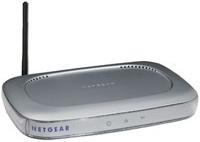
This is the "controller" of your wireless network. There are two types of access points - hardware access points and "integrated" access points. Hardware access points are used as an extension of an existing wired network. "Integrated" access points also provide the features of a router, and are connected to a high-speed connection (i.e.: DSL or cable modem.
Access points generally can serve at least 50 users, so exceeding the connection limits is rarely an issue. Remember that when you are networking, your connection is shared with all active users. Having an 11, 22, 72, 108 Mbps network connection does not make your Internet connection "faster," however, it will allow faster data transmission between the users on the same wireless network. So, if you are planning on copying a bunch of files from your bedroom computer to the living room computer, or watching a video you recorded in your living room on your bedroom computer, the data transfer speed is great.
While surfing the Internet, you may see a decrease in access speed to the Internet if your son is downloading MP3s in his bedroom and you are trying to watch an online video. Your wireless connection speed will vary based upon your location (i.e. out by the pool vs. across the room from the access point), however proper placement of your access point can assist in providing the best service to all areas you intend on using a wireless connection.
PCMCIA Wireless Adapter
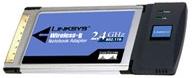
This is generally used for laptops. A PCMCIA card simply plugs into your notebook PC Card slot, and after configuration with the software provided with the card, will connect to any detected network. Some access points allow for configuration of security so only "allowed" cards are provided access. This will alleviate any problems if your neighbor decides to ride on your Internet service for free once they see you using the Internet out by your pool.
Internal Wireless Adapter
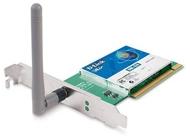
Desktop PCs can also be connected to a wireless network by using an internal PCI adapter card. To install an interanl card, you'll need to open your computers case and plug the card into an unused PCI card slot. When you restart your system, the new device will automatically be detected and the system may request that you install a driver for thew card. Insert the CD ROM that comes with the PCI adapter card and the system will find and install the driver.
USB Wireless Adapter
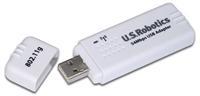
Great for use with desktop PCs, a USB wireless adapter allows you to connect your system to the wireless network without installing any adapter cards or opening your PC whatsoever. These are a convenient and easy way to add wireless networking to an existing PC in your home. Additionally, based on user feedback, an external USB device has better reception than an internal PCMCIA card in the back of your computer, as you can move it around for the best reception.
"Wired" And "Wireless" Together
You can actually build a network comprised of Integrated access points, for both wired and wireless communications. Why would you want this? Well, let's say that you have the ability to run wire for the systems in your home. The cost is less per computer (an Ethernet NIC runs about $10.00 and the cable anywhere from $5-10) and you may have them easily accessible via cable. There are many mixed-mode devices, or "Gateways" available.
This device allows you to connect to a high-speed Internet connection (via the WAN port) and up to three wired devices (on the Ethernet ports) and up to 253 devices via the wireless access point built into the unit. This allows you to have standard desktops connecting with roaming notebooks and other devices where wiring is just not possible.
In summary, if you want to run a network in your home or office, it really isn't that tough! Pick the right parts to your network "puzzle" and get the best deal available. They'll work together and you'll make better use of ALL your resources.
2. Setting Up Your System - Now that you have a plan in place that defines exactly what your equipment needs will be, how you will configure your network and what goals you expect to accomplish with wireless technology, it's time to set up your network. Before you take this step (don't worry, it's much easier than it seems), you must develop a good working understanding of the equipment involved in a wireless network.
Wireless LAN equipment consists of wireless clients - the notebook computers, printers or handheld devices that can communicate over a wireless LAN - and access points, which are the points that accept the wireless radio signals and then connect the LANs. Your access point is the central communications point for your computers.
Now it's time to build the wireless LAN! Again, don't panic - you will be amazed how simple it is. Here is what you have to do:
- Determine how many people will use your network; this will tell you how many access points you will need.
- Choose a central location for your LAN connection. If possible, this should be in an open environment to maximize your wireless range. Walls, cables, pipe, etc. within your existing environment can compromise your range.
- Configure your wireless network to work with your network.
- Test your installation before going live. With link test software you can find out what percent of your data is being sent correctly, how much time it takes to receive a response from the destination device, how the strength of the transmitted signal.
- Establish a protocol for managing your wireless LAN.
3. Implement security measures to protect the integrity of your wireless network - Remember, wireless communications transmit through the air rather than over a closed capable. Therefore, maintaining security over your system requires measures that are specific to wireless. Wireless security solutions include Media Access Control (MAC), WEP encryption and Traditional VPN (Virtual Private Network) securities controls. Following are brief summaries of these solutions:
- MAC - Media Access Control restricts network access by unauthorized devices by assigning each network card a unique hardware identification number.
- WEP Encryption - A software algorithm that scrambles outgoing data and unscrambles it when it is received, maintaining its integrity while en route.
- Traditional VPN (Virtual Private Network) security controls - Allows users outside your system to gain access to your network. VPNs encrypt data prior to transmission over a wireless link, ensuring data security even if it is intercepted. VPNs are particularly critical when you are using a public hot spot.
Three simple steps - that's all it takes to join the wireless revolution - along with a relatively small investment in new technology that you will recoup many times with your exponentially improved efficiency and streamlined operation. We have the expertise, incomparable product line and unparalleled pricing to help you become experience all the advantages of benefits of wireless technology.

More Networking Basics:
• The Network Technician Career Field
• Media Access Control (MAC) Sublayer of the OSI Data Link Layer
• Servers - Racks, Blades and Towers
• Network Patch Panel Basics
• What is Cloud Computing?
• CompTIA Network+ Video Mentor
• Satellite Broadband Internet Service
• Fiber Optic Cabling For Beginners
• Cloud Delivery Models
• Network Servers