
Mobile Broadband allows you to get Internet access from anywhere within the range of cell tower which, depending on the location and the terrain, can be up to 50 miles. To enable a laptop to use the cellular network requires a cellular modem for your PC. Cellular networks are actually large mesh networks.
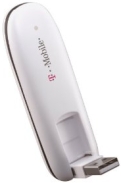
The T-Mobile Rocket 4G offers plug-and-play convenience and it's compatible with laptops running Microsoft Windows and Mac OS X. The built-in Connection Manager software allows you to connect to Wi-Fi networks or 4G mobile broadband with capability of up to 21 Mbps peak download speeds. You can choose from three prepaid plans, ranging from $10 for 100 MB of use in a week to $30 for 1 GB or $50 for 3 GB of data used within 30 days.
Some cellular modems are used with CardBus slots, others can be connected to a USB port. Cellular modems that use the GSM (Global System for Mobile Communications) system require you to activate the SIM (Subscriber Identity Module) card, which contains subscriber details that identifies the caller to the network service provider.
Cellular modems that use the CDMA (Code Division Multiple Access) system do not use SIM cards, but instead use a utility provided by the mobile network provider to make the connection to the cellular network.
The data speeds of cellular modems has advanced rapidly over the years. 2G (which stands for second-generation, 1G being the first-generation which operated at speeds between 2.9KBps and 5.6KBps.) technology was first commercially launched on the GSM standard in Finland in 1991. 2G data rates range from 56 kbps up to 200 kbps depending upon your location.
3G (third-generation) mobile communications is specified by the International Mobile Telecommunications-2000 (IMT-2000) specification by the International Telecommunication Union. To meet the IMT-2000 standards, a system is required to provide peak data rates of at least 200 kbps. Some locations can provide 3G data rates up to 2.5Mbps.
4G (fourth generation) cellular mobile communications is specified by the International Mobile Telecommunications-Advanced (IMT-Advanced) specification. The IMT-Advanced standards require a peak speed of 100 Mbps for high mobility communication (such as from trains and cars) and 1 Gbps for low mobility communication (such as pedestrians and stationary users).

More Networking Basics:
• How to Study For and Pass the CompTIA Network+ Exam
• What Routers Do
• Network Servers
• Basics of Bluetooth Technology
• CompTIA Network+ Video Mentor
• What is the Internet of Things?
• The Function of the Three Planes of Junos Network OS
• What is Port Forwarding?
• Cloud Service Models
• Packet Switching Store-and-Forward Transmission