Ever wanted to create a slideshow of images, text and audio? This article will show you how to make a presentation with OpenOffice.org Impress, which you can easily export to flash so you can share it with others.
Welcome to Bucaro TecHelp!

Welcome to Bucaro TecHelp!
Maintain Your Computer and Use it More Effectively
to Design a Web Site and Make Money on the Web

About Bucaro TecHelp About BTH User Agreement User Agreement Privacy Policy Privacy Site Map Site Map Contact Bucaro TecHelp Contact Advertise on Bucaro TecHelp Advertise Here RSS News Feeds News Feeds

HTML5 Solutions: Essential Techniques for HTML5 Developers

Essential Techniques for HTML5 Developers

HTML5 brings the biggest changes to HTML in years. Web designers now have new techniques, from displaying video and audio natively in HTML, to creating realtime graphics on a web page without a plugin.

This book provides a collection of solutions to all of the most common HTML5 problems. Every solution contains sample code that is production-ready and can be applied to any project.

Click Here

How to Share a Presentation Online with OpenOffice.org

Ever wanted to create a slideshow of images, text and audio? Perhaps you want to create a simple video but don't want to get involved in video editing software. Presentation software is an alternative that might work for you. This article will show you how to make a presentation with OpenOffice.org Impress, which you can easily export to flash (the most common video format online) so you can share it with others.

1. Launch OpenOffice.org Impress and the wizard should appear.
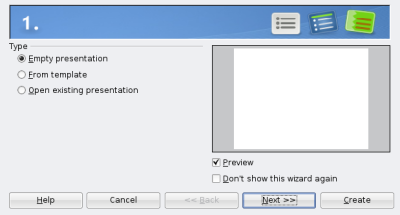
Choose presentation type

2. Choose type (empty presentation, from template or open existing presentation) and click Next.
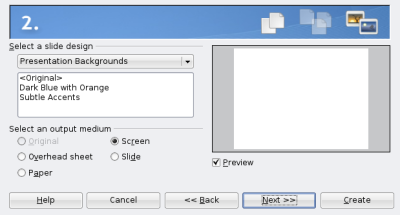
Choose a slide design

3. Choose a slide design (presentation backgrounds or presentation templates), leave output medium as screen and click Next.
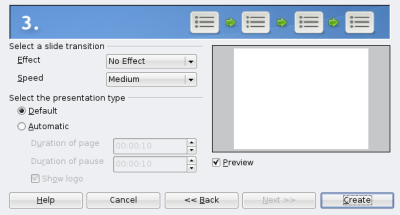
Choose a slide transition

4. Choose a slide transition (effect and speed) and click Create.

5. Click Insert then add text or a picture.
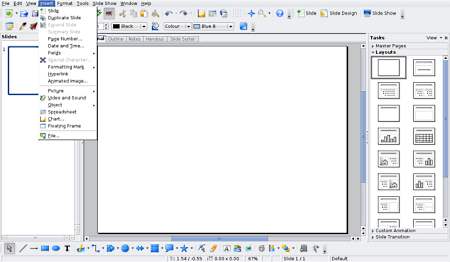
Click Insert then Slide

6. Click Insert then Slide to add the next slide.

Web Design Sections

RSS Feed RSS Feed

Google Reader or Homepage
Add to My Yahoo!

Add to My AOL
Add to Technorati Favorites!

Web Design Tools
Invent Your Own Computer Games with Python
Free Business Tools for Enterprise
Free Online Office Suite - Google Docs
Introduction to Google Docs Spreadsheets
Scribus Free Open-Source Professional Desktop Publishing Application
Better Archiving and Extracting Tool
Webmaster Tools
Tools for Online Tracking
RSS Tools
Create Cool Site Navigation in a Flash
Seven Essential Online Tools for Non-Webmasters
Tools to Track Your Site Visitors
Seven Free Statistics Trackers for Your Website
Design A Logo For Your Site
Blogger Versus WordPress - Which Should You Choose?
Using WordPress As a Content Management System
Web Design - Joomla Versus WordPress
Top Five Photoshop Alternatives
Video - A Blender Tutorial
Video - Using Kompozer The Best Free WYSIWYG Editor
Video- How to Build a Website in Kompozer
Web Designer's Reference
How to Share a Presentation Online with OpenOffice.org
Writing For a PowerPoint Presentation


[Site User Agreement] [Advertise on This site] [Search This Site] [Contact Form]
Copyright©2001-2011 Bucaro TecHelp 13771 N Fountain Hills Blvd Suite 114-248 Fountain Hills, AZ 85268

