Easy Java Script Slide Show Code
By Stephen Bucaro
Most of the example code that I’ve found on the web is bloated with unnecessary
complexity. Maybe the authors were trying to show off their proficiency in
programming. The extra complexity makes it very difficult to modify the examples for
your own use.
This article provides the minimal code for a JavaScript slide show. The slide
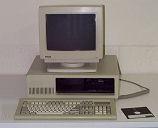
show below displays the first computers that I built. The first one is an IBM PC XT
clone that I built in 1984 (that’s right, you’re all newbies to me).
One of the problems with creating such a slide show is that the images should all
be the same size. If the images are not all the same size, your web page may grow
and shrink as the different images are displayed. You need to make provisions to
maintain the format of your web page. Possibly place the slide show in a table cell
with width and height set to the largest image.
In the demo slide show, I resized all the images to the height of the smallest image,
and then did some image editing to make them all the same width. You can also just put
gray borders on either side of an image to pad it out.
You can use the example code to put a slide show in your own web page by following
these four simple steps.
1. Name the image html element that you want to use for the slide show as shown
below. For this example it should be named "slide". The source (src) for the image
element would be the name of, or path to the first image in the slide show.
<img name="slide" border="0" height="390" width="380" src="firstimage.jpg">
2. In your <body> tag, enter the code to execute the swapImage function for
the onLoad event handler as shown below.
<body onLoad="swapImage()">
3. Paste the following code in the <head> section of your web page.
<script language="JavaScript">
var i = 0;
var path = new Array();

// LIST OF SLIDES
path[0] = "my8086a.jpg";
path[1] = "my8086b.jpg";
path[2] = "my80286a.jpg";
path[3] = "my80286b.jpg";

function swapImage()
{
   document.slide.src = path[i];
   if(i < path.length - 1) i++; else i = 0;
   setTimeout("swapImage()",3000);
}
</script>
4. Edit the entries in the list of slides, replacing the names of my images with
the names or paths to your images. If you have fewer images, delete the extra lines
starting from the bottom. If you want more than four images in your slide show,
follow the pattern to add more lines, making sure to increment the array index
(number inside the brackets).
See the number 3000 in the code above? That sets the time between slides to 3000
milliseconds (3 seconds). You can increase or decrease that number as you choose.
That's all there is to it. You can easily use this code to create a slide show on
your web page. Give it a try. As simple as it is, it will really impress your friends!
More Java Script Code:
• Easy Slide Show Code with Mouseover Pause
• Convert Mixed Number to Decimal
• Submit Forms Without CGI
• Java Script Code to Factor Numbers
• How to Use HTML5 canvas arc and arcTo Functions
• Easy Slide Show Code With Linked Slides
• HTML5 Canvas Storing and Clearing Transformations
• Regular Expressions Subexpressions
• Calculators for Your Website : Decimal to Hexidecimal Converter
• JavaScript Code to Save and Load a Table Using HTML5 Web Storage
| 

 About BTH
 User Agreement
 Privacy
 Site Map
 Contact
 News Feeds


 RSS Feed
 Follow @Stephen Bucaro
 General Web Design


