Disable IE8 Accelerators on Your Website
By Stephen Bucaro
Accelerators is a new feature added to Internet Explorer 8. When a user highlights text or double-clicks
on text in a webpage, the accelerator icon appears near the text. Click on the icon and a popup menu
appears. According to microsoft, accelerators "help you quickly perform your everyday browsing tasks
without navigating to other websites to get things done". Accelerators may well be a useful feature for
Internet users, but for webmasters, it's a way for Microsoft to steal their search revenue.
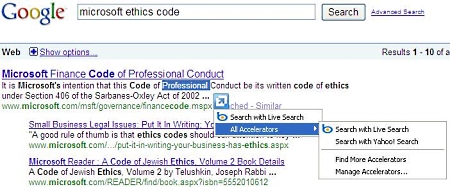
The image above shows Microsoft's Accelerators menu in Google's search results. In other words,
Microsoft is using IE8 Accelerators to steal search revenue directly from Google!
By default the first item in the menu is Search with Live Search. In other words, IE8 is going to use
your website content to generate search revenue for Microsoft. IE8 users have control of the arrangement of
links in the Accelerators menu, they can even disable Accelerators entirely. However, most users are just
going to leave Microsoft's Live Search at the top of the Accelerators menu and conveniently use it for search.
If you have a website that has no provisions for generating search revenue, then you may not care
if Microsoft profits from your work. If you have a website that does generate search revenue, for example
through the Google AdSense program, then Microsoft is stealing some of your search revenue. I'm a
member of the AdSense program and I work hard to create quality content for my website. I don't make
a lot of money from search revenue so I don't know why the richest man on the planet wants to steal it from me.
I've searched all day on the Internet and on Microsoft's Website to find a way to disable IE8 Accelerators
on my Website, but apparently Microsoft provides no way disable it. Accelerators rely on users being
able to select text on your webpage. At this time the only method I know of to prevent Microsoft from
stealing your search revenue is to take away your website visitors ability to select text on your webpages.
Microsoft does provide a proprietary way to disable the ability to select the contents of an html
element. By applying the UNSELECTABLE="on" attribute to an html element, you can disable the
ability to select its contents. However, the attributes effect is not inheritable. In other words if you
apply it to the <body> tag, child elements within the body are not affected. You need to apply
it to the lowest element in the document tree.
| 

 About BTH
 User Agreement
 Privacy
 Site Map
 Contact
 News Feeds


 RSS Feed
 Follow @Stephen Bucaro
 General Web Design


