
A frame creates a separate pane within the browser window. A frame can contain its own webpage, or it can provide a different view of the same webpage in another frame in the same browser window. A frame may have a border, or be borderless. A frame may or may not have scrollbars. A frame may or may not be resizable.
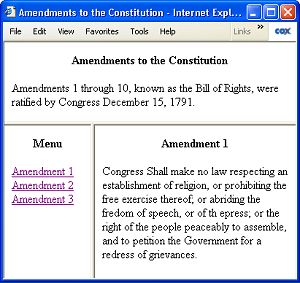
A frame is always contained within a frameset which may contain one or more frames. The frameset shown above contains three frames, the menu and content area frames are within one frameset which is nested along with the header frame inside a second frameset. The code for this example is shown below.
<html>
<head>
<title>Amendments to the Constitution</title>
</head>
<frameset rows="110, *">
  <frame src="header.htm">
  <frameset cols="120, *">
    <frame src="menu.htm">
    <frame name="content" src="content1.htm">
  </frameset>
</frameset>
</html>
The <frame> tag defines a frame within a <frameset>. A frame may have the following attributes:
| Attribute | Description |
| src | URL of the document to be displayed in the frame |
| name | Name used for TARGET attribute in <a href> links |
| frameborder | Whether to display a border, 1=yes or 0=no |
| framespacing | Space between frames, in pixels |
| marginwidth | Size of left and right margins, in pixels |
| marginheight | Size of top and bottom margins, in pixels |
| scrolling | Defines scrolling, values are yes, no and auto |
| noresize | Prevents user from resizing the frame |
The <frameset> </frameset> tags define a set of frames.
<html>
<head>
<title>Two Vertical Frames</title>
</head>
  <frameset cols="200, 400">
    <frame src="leftcol.htm">
    <frame src="rightcol.htm">
  </frameset>
</html>
The document that defines the frameset has a head section, but no body section. The frameset tags take the place of the body tags. A frameset may have the following atributes:
| Attribute | Description |
| rows | Width of frame in number of rows or percentage of window width. * indicates frame should take up remaining space |
| cols | Height of frame in number of columns or percentage of window height. * indicates frame should take up remaining space |
<frameset cols="200, 400">
  <frame src="leftcol.htm">
  <frame src="rightcol.htm">
</frameset>
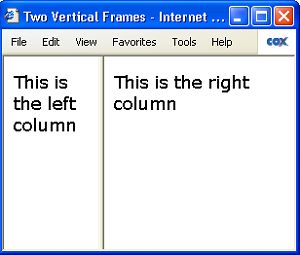
The frameset shown above contains two vertical frames, the frameset cols attribute sets the left frame to 200 pixels wide, and sets the right frame to 400 pixels wide. However, if the browser window is not exactly 600 pixels wide, each frame will expand or contract proportionally as required to fill the browser window.
<frameset cols="100, *, 150">
  <frame src="leftcol.htm">
  <frame scrolling="yes" src="centercol.htm">
  <frame src="rightcol.htm">
</frameset>
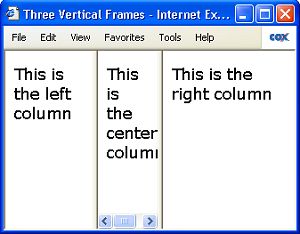
The frameset shown above contains three vertical frames, the frameset cols attribute sets the left frame to 100 pixels wide, the right frame to 150 pixels wide, and the center frame to * (meaning take up the remaining space). If the browser window is large, the left and right frames will maintain their specified size, with the center column expanding to take up the remaining space.
If the browser window width is small, the center frame width will shrink. If the center frame gets too thin to display its contents, a horizontal scrollbar will appear. If the browser window gets thinner than 100 + 150 pixels, the center frame will disappear. If the browser windows gets even thinner, the left and/or right frames may get too thin to display their contents, and they too will display scrollbars.
<frameset rows="30%, 70%">
  <frame src="topsection.htm">
  <frame src="bottomsection.htm">
</frameset>
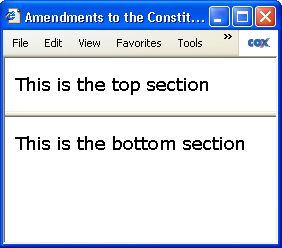
The frameset shown above contains two horizontal frames, the frameset rows attribute sets the top frame to 30% high (30% of the height of the browser window), and the bottom frame to 70% high. If the browser window height is too short for either frame to display it's contents, a vertical scrollbar will appear.
You can set the frameset rows attribute for a frame to * to take up the remaining space. Since we're using percent in this example, the rows values should add up to 100%. The only time you might use * when specifying dimensions in percent is if you had a complex frame structure and were too lazy to calculate the total.
You can prevent a frame from displaying a scrollbar by setting it's scrolling attribute to no. setting it's scrolling attribute to yes will cause the scrollbars to display always. setting it's scrolling attribute to auto adds and removes scrollbars automatically when a frame gets too small to display it's contents.
Nesting Frames
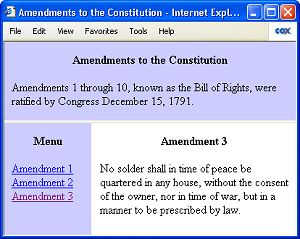
<frameset rows="110, *">
  <frame src="header.htm">
  <frameset cols="120, *">
      <frame frameborder="no" src="menu.htm">
      <frame frameborder="no" name="content" src="content1.htm">
  </frameset>
</frameset>
Nesting Frames means defining a frameset within another frameset. In the example code above, the outer frameset divides the browser window into two parts vertically. One part holds the frame named "header", the other part holds an inner frameset that divides the browser window into two parts horizontally for the frames named "menu" and "content". Framesets may be nested to any level.
Targeting a Frame
<html>
<head>
<title>Amendments to the Constitution</title>
</head>
<frameset rows="110, *">
  <frame src="header.htm">
  <frameset cols="120, *">
      <frame src="menu.htm">
      <frame name="content" src="content1.htm">
  </frameset>
</frameset>
</html>
In the code shown above, one of the frame tags contains the name attribute. In this example the name attribute is set to the value "content". Assigning a name to a frame allows us to use a link to load new content into the frame. Assign the URL of the new content to the links href attribute, and assign the frames name to the links Target attribute. An example of such a link is shown below.
<a target="content" href="content2.htm">Amendment 2</a>
This link placed in the content of a different frame in the same frameset, when clicked on, will load the webpage "content2.htm" into the frame named "content".
The Iframe
An iframe, (inline frame) is a frame that is specified without a frameset. An iframe can be embedded within the content in the body section of a webpage and it can contain an image or webpage within itself, not necessarily from the same website. The src attribute defines the URL of the document to be displayed in the Iframe.
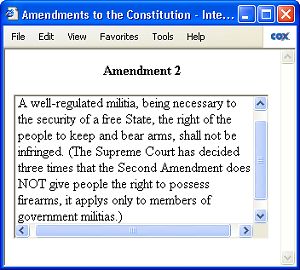
<iframe src="content2.htm" width="300" height="170" scrolling="auto" frameborder="1"></iframe>
An iframe may have the following atributes:
| src | URL of the document to be displayed in the frame |
| name | Name used for TARGET attribute in <a href> links |
| frameborder | Whether to display a border, 1=yes or 0=no |
| align | Alignment of Iframe, top, middle, bottom, left, or right |
| marginwidth | Size of left and right margins, in pixels |
| marginheight | Size of top and bottom margins, in pixels |
| height | Height of the Iframe in pixels |
| width | Width of the Iframe in pixels |
| scrolling | Defines scrolling, values are yes, no and auto |
The example iframe shown above sets the scrolling attribute to auto and the frameborder attribute to 1. If we were to set the scrolling attribute to no and the frameborder attribute to no, it would not be apparent to the user that the information displayed came from another source (possibly a different website). That's why iframes are often used to syndicate information.
• An iframe does not have a noresize attribute because it can't be resized.
Conclusion
At one time, frames were very popular. As you can see, frames are not useful for maintaining an absolute size. They have a tendency to expand or shrink with the browser window. If you design a website with the header in one frame and the content in a different frame, it's easy for another website to steal your content and reframe it under their header. For this reason frames have become less popular today.
However, a frameset is a useful structure for maintaining state. The user can load different content into one frame while variables or data about the users session is stored in another frame.

More HTML Code:
• How to Use a Meta Redirect
• Can Enterprise Applications Be Made Using HTML5?
• HTML Editors
• HTML5 Header Element
• Use HTML Target Attribute to Specify Where to Open Document
• Code For a Basic 2-Column Fluid Webpage Layout
• HTML Definition List
• How to Write and Run HTML
• Text Features
• Using del and ins Tags to Mark Up Editing on HTML Page