
An Image Map allows you to define areas of an image that act like a link so that when the user clicks on an area, the browser loads the target webpage or media file. The areas defined do not have to be the same size or shape.
The first step to create an image map is to create or select the image that will be used for the map. Below is an image showing the three basic shapes defined for image maps; rect, circle, and poly.

The second step is to define the coordinates of the areas associated with each link. If the square shown below represents the image, the origin (x=0 y=0) of the image is in the upper-left corner. X values increase as you move to the right across the image and Y values increase as you move to the bottom of the image.
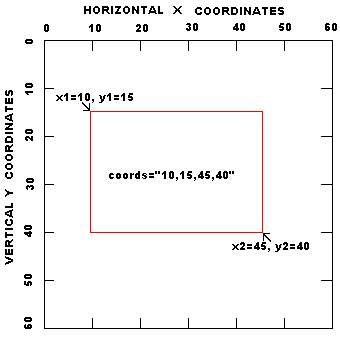
• The easiest way to determine the coordinates of an area is to load the image into Windows Paint program, or your favorite graphics editing application, then place your mouse pointer over each point in the image for which you want coordinates, and view the coordinates of that point in the status bar.
Shown below is the code for the example image map. Note that, the code for the map containing the tags that define the areas must come first in the code before the code that loads the image that uses the map.
<map name="testmap">
<area shape="rect" coords="10,10,40,40" alt="rect" href="page1.htm">
<area shape="circle" coords="65,30,15" alt="circle" href="page2.htm">
<area shape="poly" coords="90,40,120,10,150,40,90,40" alt="poly" href="page3.htm">
</map>

<img border=0 width=160 height=50 src="testmap.gif" usemap="#testmap">
Below are the html tags and their attributes.
-
<map>
- Attributes:
- name Name referenced by USEMAP
-
<area>
- Attributes:
- shape The shape of the clickable area. values: rect, circle, poly
- coords Coordinates of the clickable area
- rect: left-x, top-y, right-x, bottom-y
- circle: centerX, centerY, radius
- poly: x1,y1,x2,y2, ... xn,yn
- alt Tooltip text
- href URL to load when the area is clicked
• Note that the meaning of the values in the coords attribute depends upon the shape specified in the shape attribute.
Here's a more complex example using coordinates to define polygons for four states in the southwest U.S.
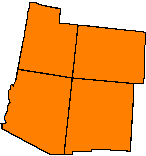
Shown below is the code for the above image map.
<map name="southwest">
<area shape="poly" coords="28,1,60,10,60,24,76,24,71,78,17,70,28,1" alt="Utah" href="#" onclick="javascript:return false;">
<area shape="poly" coords="77,25,145,32,143,84,72,78,77,25" alt="Colorado" href="#" onclick="javascript:return false;">
<area shape="poly" coords="16,70,70,77,63,155,48,155,0,128,16,70" alt="Arizona" href="#" onclick="javascript:return false;">
<area shape="poly" coords="71,78,132,84,128,155,63,155,71,78" alt="New Mexico" href="#" onclick="javascript:return false;">
</map>
• Note in the code that I used each areas onclick event to execute javascript:return false;. This prevents the link from actually executing. You might want to use this method when you just want the image map to display tool tips, for example to call out the nomenclature an object.
Tips for designing complex image maps
1. Define and the coordinates for one area at a time and test each area by moving the mouse pointer over the area to display the tool tip for that area.
2. Don't overlap areas.
3. For very complex shapes, use the polygon shape, but don't try to define the shape to exact precision using a large array of coordinates. Usually a general outline of a complex shape will suffice.
4. Don't forget to close the polygons by repeating the first coordinate as the last coordinate.
Image maps are an excellent way to provide metaphorical navigation or to call out the nomenclature of an object.

More HTML Code:
• How to Debug HTML
• Keywords Meta Tag Generator
• Web Page Template
• HTML dfn Tag
• HTML Text Tags Basics
• Image Map Basics
• Form Input Labels
• Add an Image to a Web Page
• Use fieldset to Organize Form Elements
• HTML5 Header Element