To add a new node on a segment use the Insert new nodes button on the Edit path nodes tool control bar. These steps assume that you have already drawn a segment e.g. using the Bezier Curves and straight lines tool.
Welcome to Bucaro TecHelp!

Welcome to Bucaro TecHelp!
Maintain Your Computer and Use it More Effectively
to Design a Web Site and Make Money on the Web

About Bucaro TecHelp About BTH User Agreement User Agreement Privacy Policy Privacy Site Map Site Map Contact Bucaro TecHelp Contact Advertise on Bucaro TecHelp Advertise Here RSS News Feeds News Feeds

HTML5 Solutions: Essential Techniques for HTML5 Developers

Essential Techniques for HTML5 Developers

HTML5 brings the biggest changes to HTML in years. Web designers now have new techniques, from displaying video and audio natively in HTML, to creating realtime graphics on a web page without a plugin.

This book provides a collection of solutions to all of the most common HTML5 problems. Every solution contains sample code that is production-ready and can be applied to any project.

Click Here

Inkscape - How to Add a New Node

To add a new node on a segment use the Insert new nodes button on the Edit path nodes tool control bar. These steps assume that you have already drawn a segment e.g. using the Bezier Curves and straight lines tool.

1. Click on the Edit path nodes tool button Edit path nodes tool button and then click on the segment to select the segment.
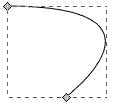
Selected segment

2. Drag a box around the segment (or two adjacent nodes on the segment) to select both nodes.
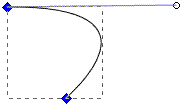
Selected nodes

3. Click on the Insert new nodes button Insert new nodes button on the tool bar to insert a new node between the two selected nodes.
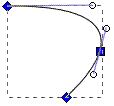
Segment with new node

• Clicking on the Insert new nodes button with three nodes selected will add two new nodes to the segment between the three selected nodes. Clicking on the Insert new nodes button with four nodes selected will add three new nodes to the segment between the four selected nodes, and so on.

Web Design Sections

RSS Feed RSS Feed

Google Reader or Homepage
Add to My Yahoo!
Subscribe with Bloglines
Subscribe in NewsGator Online

Add to My AOL
Add to Technorati Favorites!

Graphics Design
Pencil Free Open Source Cartoon Animation Drawing Program
Animation Software - The Amazing 3D World
Graphic Design Meets Open Source
Anti-Aliasing
Free Animated GIF Maker
Paint Shop Pro : Version 4 Was Best
Graphics File Formats for Your Web Page
The Browser Safe Palette
Image Scanning : Confused About DPI?
An Insight to Logos
Building an Image with a Logo
CSS Button Designer
What is the Pantone Color System?
Color Harmony in Web Design
RGB Color Schemer
RGB Color Schemer FAQs
RGB Vs CMYK
Hexadecimal Color Notation on the Web
Web Designer's Reference
Beginning GIMP: From Novice to Professional
The Game Maker's Apprentice
The Blender Gamekit
Stop Motion Animation: Nine Creative and Easy Techniques
How to Make a Simple Video
How to Create a Simple Video with Windows Movie Maker
How to Embed a YouTube Video in Your Webpage
Free eBook - How to Be a Video Game Designer
How to Make a Video Game for your Xbox for Free
Get GIMP - Free Replacement for Overpriced Photoshop
Use GIMP to Scale (Resize) an Image
Graphics Design for Beginners - Cropping Images
Graphics Design for Beginners - Blur Filters
Create GIF Animations With Free GIMP Image Editing Program
How to De-haze a Photo with GIMP
How to Make Beautiful Skies with GIMP
Inkscape - Free Vector Graphics Illusttration Package
Inkscape Basics
Basic Inkscape Vector Drawing
Inkscape - How to Add a New Node
Inkscape - How to Join Two Segments at Endnodes
How to Place Greek Letters in an Inkscape Drawing
How to Make a Simple Animated Banner in Flash CS3
How to Trace an Image Using Photoshop
How to Create a Product Box in Photoshop


[Site User Agreement] [Advertise on This site] [Search This Site] [Contact Form]
Copyright©2001-2011 Bucaro TecHelp 13771 N Fountain Hills Blvd Suite 114-248 Fountain Hills, AZ 85268