
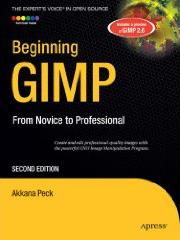
This book is for graphics designers, digital photographers, and hobbyists who need a full–featured image manipulation program but don’t have hundreds of dollars to pay for Photoshop. GIMP is also the preferred image manipulation application for the open source advocate. GIMP is available on Windows, Linux, and Mac OSX.
From first installation to advanced image manipulation techniques, Beginning GIMP explains how anyone can utilize This free, open source image manipulation program. Once you’ve installed the application, you’ll learn about the interface and configuration options, and then jump into a quick and simple project to familiarize yourself.
With four–color graphics and screenshots throughout, you’ll learn how to prepare camera images for display on web pages — including processes like rescaling, cropping, and balancing color. Utilizing layers, paths, and masks are also covered in extensive detail. Of course, you will also learn how to draw lines and shapes; utilize patterns and gradients; and even create your own brushes, patterns, and gradients.
GIMP expert and author Akkana Peck teaches you how to touch up digital photographs, removing any blemishes, fixing red–eye, and stitching panoramic images. You’ll learn how to tap into the powerful filters, effects, and plug–ins that are available for GIMP and automate tasks using scripts. The entire book is approached in a project–based manner, and as you progress, numerous projects will help strengthen your newly acquired abilities.
Click Here for more information...
What you’ll learn:
• Install The GIMP on Windows, Linux, and Mac OSX.
• Explore the interface and configuration options.
• Prepare your camera images for use on the Web, including rescaling, cropping, and balancing color.
• Learn basic techniques such as drawing lines and shapes, utilizing patterns, and making use of gradients.
• Master advanced techniques such as layers, paths, and masks.
• Create your own brushes, patterns, and gradients.
• Discover tricks for fixing blemishes, removing redeye, and stitching together panoramic images.
• Bonus Project: Making GIF Animations
Reader Thomas Duff of Portland, OR says,"I'm the first to admit that my graphical skills are limited. I have a version of PaintShop Pro that's a few revs out of date, and it does just what I need it to do... crop images, circle items of note, and erase the stray word or two. I've downloaded GIMP before, but I just don't have the time or motivation to explore all the options it appears to have. But after reading Beginning GIMP: From Novice to Professional by Akkana Peck, I think I'm about to make the switch to GIMP, and to make it permanently. This is a really well-done book...
"Contents: Get to Know the GIMP; Improving Digital Photos; Introduction to Layers; Drawing; Selection; Erasing and Touching Up; Filters and Effects; Color Manipulation, Channels, and Layer Modes; Advanced Drawing; Advanced Compositing; Plug-Ins and Scripting; Additional Topics; Getting and Installing the GIMP; Installing the GIMP on Windows; Installing the GIMP on Mac; Installing the GIMP on Linux or Unix; Building From Source; First Startup; Index.
"Peck has tried to create a book that allows graphical neophytes like me to figure out what's going on, while also including material for those who have been doing this awhile. She definitely hits the first mark, and I think she nails the second one, also. The book starts with the basic of the GIMP interface, with an abundance of screen shots and images to illustrate the points. Even someone like me can easily see what's possible with the software, and I was able to quickly find and focus on the few tasks I do often with my existing software. I normally start to zone out when books start to head into the layers and color manipulation area, because I've never had much luck when it comes to that. But the author actually had me fishing out a few digital photos to try some things. I can even start to fix some of my good photos that were a victim of the demon red-eye effects...
"Bottom line... My old PaintShop Pro is now on the way out, as well as my out-of-date book on it. GIMP's getting loaded on all the PCs, and with the help of this book, I might even become... <gasp!> GRAPHICALLY CREATIVE!"
Click Here for more information...
Reader Chad Smith of Saint Louis, MO says,"Akkana Peck has written a very thorough introduction to the GIMP. In fact, I'd call it more of a definitive guide than just an introduction. This book is great for the completely new user, but even the seasoned veteran can learn quite a bit from "Beginning GIMP: From Novice to Professional".
"Covering everything from where to get and how to install the GIMP to how to use the powerful built-in scripting language Script-Fu, which allows users to use and program scripts for repeatable actions, like adding bevel or glass effects. Despite its thoroughness - it's written in a easy-to-understand way that anyone can benefit from. All this and the software (GIMP) is free for Windows, Mac, Unix, or Linux!
Click Here for more information...

More Graphics Design Tips:
• An Insight to Logos
• MathML mtext Element to Display Plain Text
• Getting Started with Blender
• Draw Bezier SVG Drawing Application
• Inkscape - How to Delete a Node
• MathML File Structure
• Inkscape: Combine the Paths of Multiple Shapes
• Inkscape Circles, Ellipses, and Arcs Drawing Tutorial
• SVG Example Code to Scale Elements
• Inkscape Basic Fill