
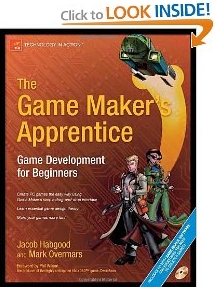
The Game Makers Apprentice shows you how to create nine exciting games using the wildly popular Game Maker game creation tool. This book covers a range of genres, including action, adventure, and puzzle games complete with professional quality sound effects and visuals. It discusses game design theory and features practical examples of how this can be applied to making games that are more fun to play.
Game Maker allows games to be created using a simple drag-and-drop interface, so you don't need to have any prior coding experience. It includes an optional programming language for adding advanced features to your games, when you feel ready to do so.
The authors include the creator of the Game Maker tool and a former professional game programmer, so you'll glean understanding from their expertise. The book also includes a DVD containing Game Maker software and all of the game projects that are created in the bookplus a host of professional-quality graphics and sound effects that you can use in your own games.
Excerpt:
As you progress through this book you'll build a series of excellent games that you might never have even dreamed you could be capable of creating right now. The instructions are clear and concise, but also encourage you to experiment with your own designs. For example your version of the captivating and original Koalabr8 game (Chapter 7) will almost certainly be a unique piece of software. The crazy devices you invent, and the way you lay out your levels, will certainly differ from mine. Watch out for Lazarus too (Chapter 4) it may interest you to know that this eponymous hero first appeared in Jacob's student portfolio, and was partly responsible for securing his first programming job in the industry!
Alexander Aris of Oxford, United Kingdom says,"The Game Maker's Apprentice has to be one of my most eagerly awaited Computer Book purchases for quite sometime. The fabulous presentation and great use of terminology, really makes it a joy to read. Each chapter guides you through gently, in order to achieve more confidence into creating your own game or project. Each page is colourful and the beautiful illustrations brings things to life.
"The book is accompanied by a great CD with all of the examples, resources and Game Maker itself, which is really easy to get into. Within no time at all, you'll get used to it's interface and workings. The tutorials start you off with the basics and progressively bring you to the wonderfully powerful Game Maker Language (GML). So not only can you create games using a Drag 'n' Drop interface, you can also use a powerful programming language as well. All of this is included in the unregistered version, but by paying an ever so reasonable registration fee, you unlock the full potential of Game Maker.
"I used Game Maker to create my first ever PC game, Bugsy. The Game Maker Forum helped me out when I came across a problem or a bug I couldn't resolve. There a lots of games and projects created with this wonderful program. You will also find many other sites across the Internet that provide helpful advice and tutorials. Not forgetting the official Game Maker site run and hosted by Mark Overmars.
"The books co-writer, Jacob Habgood, has made a marvellous job along side Mark, to make this a very interesting book indeed. You might also be interested to know, that another book covering the Game Maker theme, Basic Game Design and Creation by Namu Swamy is available as well. This also brings you to the Game Maker stable to learn some very easy steps into the basics of game design without it appearing too boring or tiresome. Your gaming ideas and projects start here!"
Excerpt:
Who wouldn't want to make computer games? It's creative, rewarding, and these days even pretty darn cool too. You can make them to share with your school friends, your work colleagues, your grandchildren, or even the entire gaming world. This book is not specifically for the young or old, but anyone who loves computer games and wants to have a go at making them for themselves. We've all painted a picture, written a story, and made a wobbly piece of pottery at some point in our lives, so it's time to enbrace the art form of the future and try making computer games too.
This book provides a collection of engaging tutorials that introduce you to the Game Maker tool and teach you how to use it. The first four parts of the book take you step by step through seven different projects using Game Maker's simple drag-and-drop programming system. By the time you've finished making Evil Clutches, Galactic Mail, Lazarus, Super Rainbow Reef, Koalabr8, Wingman Sam, and Tank War, you'll have a well-rounded experience of making games with Game Maker. Parts 2, 3, and 4 also end up with game design chapters that encourage you to stand back from your creations and consider how principles or game design can be used to make them more fun. Moreover, we don't just talk about it, but we provide new versions of the games with improved features so that you can experience for yourself how solid game design can lead to good gameplay.
Game Maker proides a simple environment that allows beginners to quickly start building games, using an icon-based system of events and actions (see Figure 1). This drag-and-drop programming technique provides an easy way to learn about game development and allows you to create games without going ner a traditional programming language.
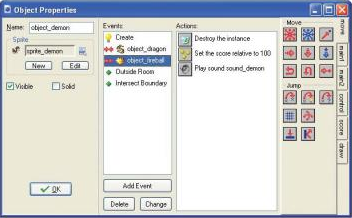
Figure 1. Game Maker's simple drag-and-drop system uses iconic events and actions to program computer games.
Bruce Kirkpatrick says,"I have been an educator and professional software developer for over 20 years now and can say that this is the most well crafted instructional book of any kind that I have ever read.
"Taking a reader from zero to being able to create interesting games while understanding the logic, design considerations, and even programming syntax needed in one 300 page book with an easy to master learning rate⁄curve is an amazing feat. The authors deserve congratulations and they certainly have mine.
"The book starts with very basic logical programming constructs and builds an initial simple tutorial from these. Through each subsequent tutorial project in the book, additional concepts are introduced while previous concepts are reinforced. The tutorials are carefully crafted such that new material is presented in very step by step detail while previously introduced concepts are referred to in an increasingly shorthand way. This is a great teaching technique and one that doesn't happen without great effort.
"Along the way, most modern programming concepts and are introduced and explored in an amazingly non-frightening manner. In occasional chapters through the book the authors take a break from the GUI coding and talk about game design in more general terms and through examples from the tutorials and modified versions of the tutorials showing how game design and game player experience can be improved.
"The final chapters of the book deal with coding games and game features in the programming language that is "behind" the Game Maker graphic user interface. While some have complained that this language is not C++, it is certainly close enough in design and syntax that any concept learned here will be readily transferable to another more common language."

Click here for more information.
More Graphics Design Tips:
• SVG Matrix Transform Example Code
• SVG For Responsive Web Design
• How to Use Draw Bezier
• Coding a Matrice in MathML
• Where To Find Free Stock Photography, Clip Art, And Other Graphics For Your Web Site
• MathML mo Element Operators
• Inkscape Basic Fill
• Inkscpe Snap Controls Bar
• SVG Code to Translate a Rectangle and Text
• Pencil Free Open Source Cartoon Animation Drawing Program