
To delete a node on a segment:
1. Click on the "Edit path by nodes"
 tool button.
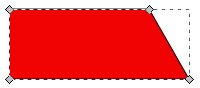
2. Then click on the object to select the nodes.
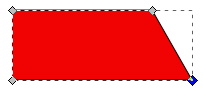
3. Click on the node you wish to delete in order to select it. Note that the selected node is highlighted.
4. Click on the "Delete selected nodes"
 button on the tool bar to delete the selected node.
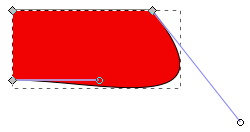
The remaining nodes adjacent to the one you deleted will now be connected with a Bezier curve.
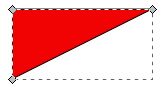
5. With the "Edit path by nodes" tool selected, drag the segment shaping handles to adjust the shape of the segment between the two remaining adjacent nodes.

More Graphics Design Tips:
• Inkscape - How to Add a New Node
• Graphics Design for Beginners - Cropping Images
• Introduction to Draw SVG Free Online SVG Drawing Application
• Graphics File Formats for Your Web Page
• SVG Code to Translate a Rectangle and Text
• Image Scanning - Confused About DPI?
• Getting Started with Blender
• Draw Bezier SVG Drawing Application
• Introduction to X3D (Extensible 3D)
• How to Make a Simple Video