position:fixed
By Stephen Bucaro
Default Behavior
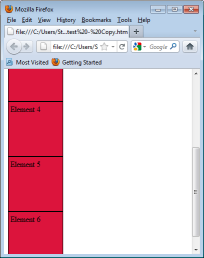
When a user srolls the browser window, the contents of the window move in the oposite direction
of the scroll bar. Shown below is the code for a webpage containing six div elements and how
they would be positioned after the user scrolled the browser window.
<html>
<head>

<style type="text/css">
.myBox
{
background-color:crimson;
border-style:solid;
border-width:1px;
padding:4px;
height:100px;
width:100px;
}
</style>

</head>
<body>

<div class="myBox">Element 1</div>
<div class="myBox">Element 2</div>
<div class="myBox">Element 3</div>
<div class="myBox">Element 4</div>
<div class="myBox">Element 5</div>
<div class="myBox">Element 6</div>

</body>
</html>
Fixed Positioning
When you specify an element's position:fixed, you take the element out of the normal
flow, and cause it to remain fixed in positioned when the browser window is scrolled. Shown
below is the code for a webpage containing six div elements, with one of the div elements
position:fixed specified, and how they would be positioned after the user scrolled the browser window.
<html>
<head>

<style type="text/css">
.myBox
{
background-color:crimson;
border-style:solid;
border-width:1px;
padding:4px;
height:100px;
width:100px;
}
.fixedBox
{
background-color:lightskyblue;
border-style:solid;
border-width:1px;
padding:4px;
height:100px;
width:100px;
position:fixed;
}
</style>

</head>
<body>

<div class="myBox">Element 1</div>
<div class="fixedBox">Element 2</div>
<div class="myBox">Element 3</div>
<div class="myBox">Element 4</div>
<div class="myBox">Element 5</div>
<div class="myBox">Element 6</div>

</body>
</html>
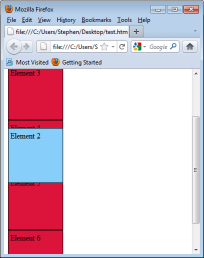
You can use the left and ⁄ or top property to place the element exactly
where you want in the browser window, and it will remain at that position regardless of scrolling.
• Note: IE6 and lower do not support fixed positioning, IE7 with "Strict" DOCTYPE does support fixed positioning.
More CSS Quick Reference:
• Set an Element's Margin
• Set the Border Color
• Set the Line Spacing
• Set Text Justification
• Set the Border Style
• Set a Fixed Background Image
• Specifying Color
• Set the Background Properties
• Set the Letter Spacing
• Use word-wrap Property to allow Line Breaks in the Middle of Words
| 

 About BTH
 User Agreement
 Privacy
 Site Map
 Contact
 News Feeds


 RSS Feed
 Follow @Stephen Bucaro
 General Web Design

