position:absolute
By Stephen Bucaro
Default Positioning
One of the most important CSS webpage layout concepts to understand is how to position
webpage elements. Every element on a webpage, be it an image, a drop-down list, or just a
paragraph of text, is actually a rectangular box, referred to as an element. When a
Web browser loads an html file, it parses the html code from left-to-right top-to-bottom, just
as we would read it and, by default, it renders the webpage, by placing elements on the webpage
from left-to-right and from top-to-bottom. You can think of this as the webpage elements
as "flowing" into position. As the elements flow onto the webpage, they line themselves up
along a "baseline".
Webpage elements that flow into position from left-to-right are called inline elements.
If there isn't enough room to the right to place an element, the browser places it on the next line.
Certain elements, like paragraphs <p>, divisions <div>, and horizontal rules <hr />,
called block elements, do not normally flow on the webpage from left-to-right. Block
elements, by default, start on a new line, causes the next element in the flow to start a new line.
The style rule position is used to override this default behavior. The value of the
position element may be set to relative, absolute, or fixed. In this article, I'll
describe the effect of setting the style rule position: relative.
Shown below is the code for a webpage containing three span elements and how
they would be rendered by default in the browser.
<html>
<head>

<style type="text/css">
.myBox
{
background-color:crimson;
border-style:solid;
border-width:1px;
padding:4px;
}
</style>

</head>
<body>

<span class="myBox">Element 1</span>
<span class="myBox">Element 2</span>
<span class="myBox">Element 3</span>

</body>
</html>

Absolute Positioning
When you specify an element's position:absolute you can relocate the element to the
exact position where you want it to go. You can use the left and ⁄ or top
property to place the element exactly where you want on the webpage.
<html>
<head>

<style type="text/css">
.myBox
{
background-color:crimson;
border-style:solid;
border-width:1px;
padding:4px;
width:80px;
}
#myAbs
{
position:absolute;
left:40px;
top:30px;
background-color:crimson;
border-style:solid;
border-width:1px;
padding:4px;
width:80px;
}
</style>

</head>
<body>

<span class="myBox">Element 1</span>
<span id="myAbs">Element 2</span>
<span class="myBox">Element 3</span>

</body>
</html>
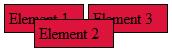
Note that Element 2 is absolute positioned 40 pixels to the right and 30 pixels down from the
upper-left corner of its containing element (the <body> element).
Note that the values of left and top are offsets relative to the element's
containing element NOT offsets with respect to another element. Other elements, even other
absolute positioned elements are not affected by the offsets, so the absolute positioned element
could overlap other elements.
More CSS Quick Reference:
• Set the Text Alignment
• position:relative
• Use Inline Style
• Set the Text Color
• Set the Text Case
• Set an Element's Display Property
• Set a Fixed Background Image
• Set the Line Spacing
• Context selectors
• Set the Border Color
| 

 About BTH
 User Agreement
 Privacy
 Site Map
 Contact
 News Feeds


 RSS Feed
 Follow @Stephen Bucaro
 General Web Design

