The CSS Box Model
By Stephen Bucaro
One of the most important CSS webpage layout concepts to understand is the box model.
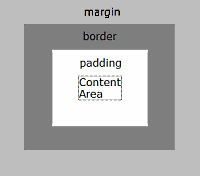
Every element on a webpage is actually a rectangular box consisting of a content
area surrounded by a border. The border is invisible because, by default, its
width is set to 0. You can make the border visible by setting the boxes
border-style property to solid or one of the other available styles.
Padding
The area between a boxes content area and its border is its padding. By default
the padding is set to 0. You can use the padding property to set the size
of the padding area. Padding cannot be set to negative values.
Text in the boxes content area
<span style="border-style:solid; padding:10px;">
Text in the boxes content area
</span>
If you set a background color or background image for a box, it will appear within
the content area and padding area.
Content Area
Content Area
Content Area
Content Area
<style type="text/css">
.box1
{
float:left;
padding:4px;
margin:4px;
border-style:solid;
border-width:1px;
background-color:#ba55d3;
}
</style>

<div class="box1">Content Area</div>
<div class="box1">Content Area</div>
<div class="box1">Content Area</div>
<div class="box1">Content Area</div>
The CSS Box Model is NOT Consistently Implemented
Exactly how a box will display depends upon the positioning method used, e.g. fixed,
relative, inline, block, float, etc. It also depends upon which other CSS properties
you set for the box and how you select the elements they apply to, e.g. inline, class,
id, etc. It is therefor important to test your layout with Internet Explorer, Firefox,
and any other browsers for which you desire to be compatible.
| 

 About BTH
 User Agreement
 Privacy
 Site Map
 Contact
 News Feeds


 RSS Feed
 Follow @Stephen Bucaro
 General Web Design


