
Want to save a picture of your computer's screen? Just press the [Print Screen] key located in the upper-right corner of your keyboard. The Print Screen key does not send an image of the screen to the printer, as you would assume, instead it sends an image of the screen to the "Clipboard".
• If you press [Alt] - [Print Screen], Windows copies only the active window (the window on top with the highlighted title bar) to the Clipboard.
Then in Windows Paint program, or your favorite graphics editor, in the Edit menu choose Paste to paste the contents of the Clipboard to an image file that you can print and/or save.
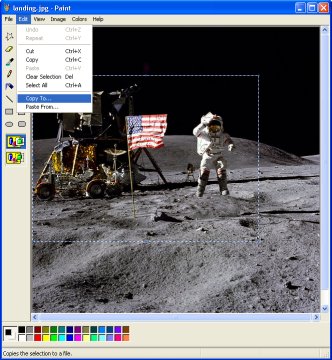
In Windows Paint program you can use the mouse to define a rectangular area of an image, then in the Edit menu choose Copy To... to save that area as an image file.
If you would like even more control over screen capture, download Wisdom Software's ScreenHunter freeware screen capture tool, which lets you capture a rectangular area of the screen you define with your mouse.

More Windows Tips:
• Change Explorer's Thumbnail Size
• Single-click to Open Applications and Files
• Record Your Own Windows Startup Greeting
• Cover Your Tracks in Internet Explorer
• Capture the Computer's Screen With the Print Screen Key
• Three Ways to Force a Program to Close
• Move a Window With Keyboard Arrow Keys
• Create Your Own Custom Taskbar Toolbar
• Use Windows Key Shortcuts
• Increase Windows 7 Notifiction Display Time