
Microsoft ignored the Web for many years because their Windows 3.1 operating system didn't have the power to deal with it. With the release of Windows 95, Microsoft decided that they owned the Web. In order to confuse users into thinking Windows is the Web, Microsoft introduced one the biggest productivity killers ever created, Active Desktop.
One of the effects of Active Desktop is "Web Style". With this configuration, Windows wastes a big area of screen space displaying a webpage containing useless information on the left side of every window. For example, the left side of the Control Panel informs you "Use the settings in Control panel to personalize your computer".
Web style does provide thumbnail previews of files in a folder. If this is what you need, stick with Web style. But understand that creating these thumbnail previews really slows down your computer. For higher productivity, configure your computer for "Classic style".
In Control Panel, open the "Folder Options" utility. On the "General" tab, set the radio buttons as shown below.
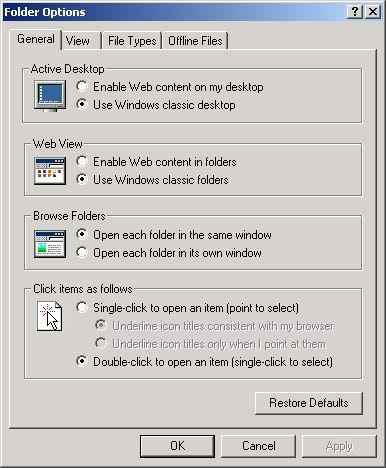
With Windows XP click on the link "Switch to Classic View". Why this annoying difference between windows XP and all other versions of windows? Because that's what you get When Microsoft releases a new version of windows, just some simple cosmetic changes. That's your "Upgrade".
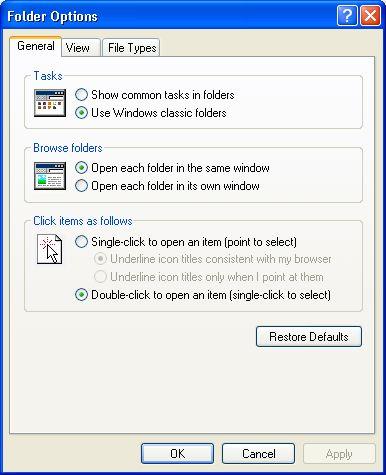
"Open each folder in the same window" prevents the operating system from spawning a new window every time you open a folder. This can rapidly clutter up your screen. If you are accustomed to a new window opening every time you open a folder, you may get confused when opening a folder only changes the contents of the current window. To achieve higher productivity, you should use the "Back" button on the windows tool bar to navigate rather than keeping many windows open on the desktop.
"Double-click to open an item" allows you to single click on an item and edit the file name directly rather than having to right-click to open a menu and then selecting "Rename" in the menu before you can edit the file name.
In the Folder Options "View" tab, check and uncheck boxes so that it looks as shown below.
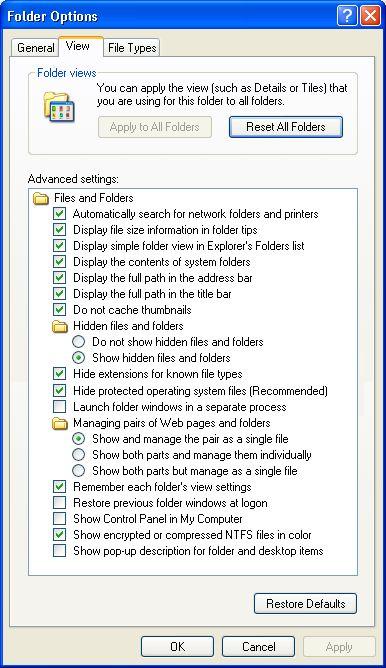
These settings are selected to make the operating system provide you with as much information as possible, except for the pop-up descriptions which provide mostly useless information and slow down your computer considerably.
By default, Windows hides file extensions. Windows relies heavily on file extensions. Why would you want to hide them? By default, protected operating system files are hidden to prevent new users from accidentally deleting them. You may want to leave this option checked. It's just my preference to not have the computer hide anything from me.
When you have completed these settings, click on the "OK" button.
Despite having 97 percent percent of the desktop operating system market, Microsoft has always been jealous of Apple Computer. That's why they copied those giant screen area wasting icons. To get rid of them, in the "View" menu of any window, select "Details". Details provides you with important information about the file, like its size and when it was last modified.
Then in the "Tools" menu, select "Folder Options...". On the "View" tab, your previous setting should still be in effect. Click on the "Like Current Folder" button (With Windows XP "Apply to All Folders"), then on the "OK" button.
After you get used to these new folder and file settings, you will find that you and your computer can work much faster. Your work will be easier and you will be more productive.

More Windows Tips:
• Desktop Shortcuts Give Quick Access to Applications and Folders
• Delete Windows App Usage History
• How to Set up an Ftp Server on Windows Xp Professional
• Disable "Hard Disk Turn Off" to Speed Up Windows XP
• Windows 7 - Five Ways to Move or Copy Files or Folders
• Move a Window With Keyboard Arrow Keys
• Window 10 Power Management
• Vista - Display Multiple Clocks on Your Desktop
• Delete Does Not Erase a File
• Vista - Restore Deleted Recycle Bin