
Windows themes are used to change the way your computer's standard sounds, icons, pointer, desktop wallpaper and screensaver appear with a customized look and feel. They can be implemented as a whole package that represents a certain concept or idea or created piece by piece by changing items such as your icons and pointers individually.
Windows 95 users had to buy an add-on pack from Microsoft called Microsoft Plus! to change desktop themes, but then Microsoft included the ability to change them in Windows 98, ME and XP.
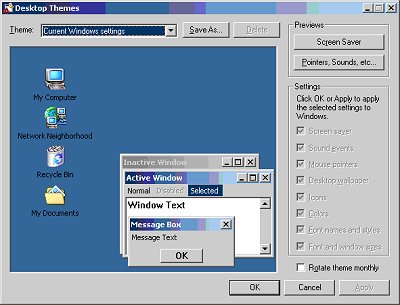
Windows 2000 is designed more for the work environment and Microsoft didn't want to highlight the fun stuff so there is no Themes icon in Control Panel. It is still possible to change your theme in Windows 2000 if you want to. Here is how you do it:
Click on Start, and then click Run,In the Open box, type themes, and then click OK, Configure your theme, and then click OK.
To change a theme in Windows XP you can right click anywhere on your desktop and select Properties. From there you will go to the Themes tab.
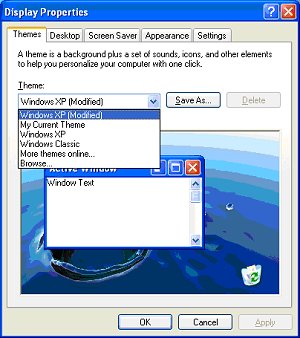
From here you can change your current theme to one of the built in Windows themes, look for more themes online from the Microsoft website to download or browse your computer for other themes you may already have on your computer.
There are many other themes you can find online and download if you simply do an online search for Windows themes.
You can also purchase Microsoft Plus! for Windows XP which is a collection of digital media tools, add-ons, games, themes, and screensavers that let you personalize your Windows XP desktop.
Visit Online Computer Tips to find all sorts of free windows tips and technical support.

More Windows Tips:
• Turn Off the User Account Control
• Move a Window With Keyboard Arrow Keys
• Change a Drive Letter
• How to Transfer a File From PC to Kindle
• Use ReadyBoost to Improve PC performance
• How to Set up an Ftp Server on Windows Xp Professional
• Synchronize Your Computer's Clock With an Internet Time Server
• Customize Internet Explorer's Security
• Remove My Recent Documents from the Start Menu
• Configure Windows 7 File Contents Searching