
Wouldn't be nice to get more information in a file listing than just the default Name, Size, Type, and Date Modified? With Windows XP, you can.
First you need to add the desired information to the file, then use Detail View (click on the folder to highlight it, then select Details in Explorer's main menu) for the folder containing the files, and then add a column to display the added information.
• First, right-click the file and in the popup menu that appears, select Properties. In the Properties dialog box that appears, on the General tab, uncheck the "Read Only" checkbox if it's checked.
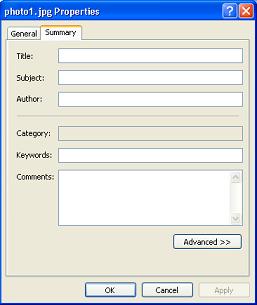
Then select the Summary tab and enter as much information as you want in the Title: and other text boxes.
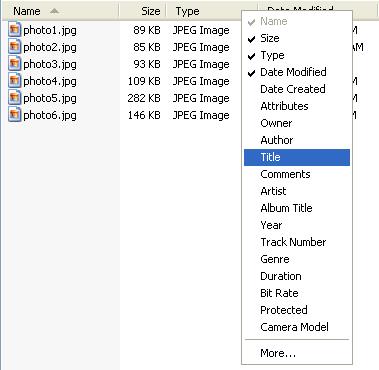
After you've added the desired information in the Properties dialog box for the files, in the Details view, right-click a blank space next to a column title. In the popup menu that appears, click next to a name of a column you want to add, for example clicking Tile puts a check mark next to Tile and adds a new Title column to the file list.
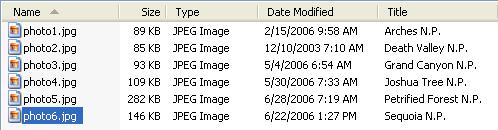
At the bottom of the columns popup menu, select More... to open the Choose Details dialog box. In the Choose Details dialog box, you can choose even more columns to add to the file list.
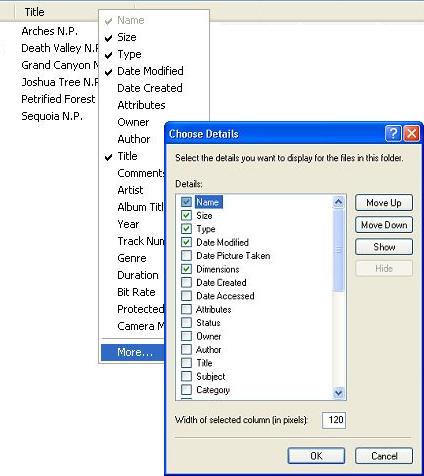
For example, For image files, it might be helpful to add the Dimensions column.
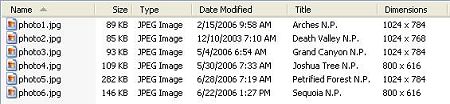
To hide a column, right-click a blank space next to a column title, and in the popup menu click next to the column title to remove the check mark and hide the column.
With Windows XP it's possible to add Titles, Authors, Dates, Comments, Dimensions, and quite a bit more than just the default file information in a files list.

More Windows Tips:
• What is Airplane Mode?
• Windows Mouse Dead? - How to Get Around Windows Without the Rodent
• Headphones: earbuds, on-ear, over-ear. What's the Difference?
• Uninstall Windows Live Messenger From Windows 7
• Configure the Start Menu
• How to Fax Documents Using Windows XP
• Change the Windows 7 Desktop Background
• Put a Shut Down Button on Your Desktop
• Backup Your Windows XP Activation Files
• Configure Recycle Bin to Immediately Delete Files