
Internet Explorer (IE) provides many options that you can configure to customize your browsing security. IE divides security into four zones: Internet, Local Intranet, Trusted Sites, and Restricted Sites. You can configure the security for each zone individually. IE tracks which zone you are accessing and sets the security accordingly.
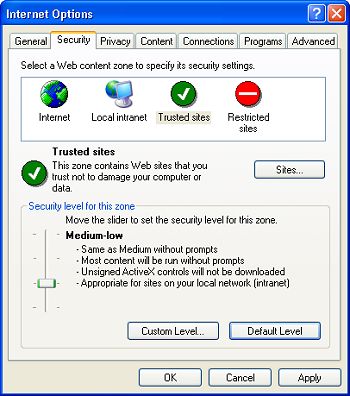
To access these configurations select Tools | Internet Options... in IE's main menu. In the Internet Options dialog box that appears, select the Security tab. On the Security tab, click on a "Web content zone" icon then on the [Default Level] button. A slider control will appear that allows you to quickly increase or decrease the security level for that zone.
To set a detailed custom security for a zone, click on the [Custom Level ...] button. In the Security Settings dialog box that appears, you can set radio buttons to configure each individual security setting. Most of the settings allow you to Disable, Enable, or Prompt a security feature.
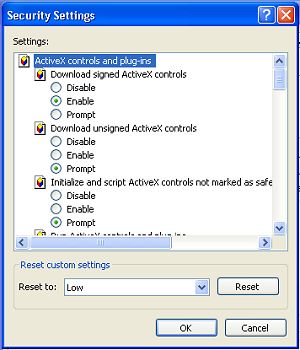
Each of these settings ends up being a compromise. For example your web surfing would be total safe if you configured all the settings to Disable, but then most of the web sites you visited would not function properly. Configuring settings to Enable allows hackers to put malware on your computer without your knowledge.
Configuring a setting to Prompt causes a message box to appear requesting your approval before a security relevant event is allowed to occur. For example, "ActiveX controls" are actually programs that can potentially harm your omputer. You would think it wise to configure IE to prompt you before allowing an ActiveX control on your computer.
However, ActiveX controls are ubiquitous on the Internet, so you would end up canceling message box after message box as you surfed the Web. That gets annoying. Similarly, any type of script can potentially harm your computer, but scripts are even more common than ActiveX controls.
In most cases the default security settings are the best choice. If you have configured a custom setting for a zone and wish to return to the default setting, on the security tab, select the zone and then click on the [Default Level] button.
• In most cases your best IE security state comes from keeping up-to-date with Microsoft security update downloads and using good firewall and antivirus programs.
Your best bet for customizing IE's security settings is to add specific sites to the Trusted and Restricted zones. On the Internet Options dialog box Security tab, select the Trusted sites zone and the click on the [Sites...] button.
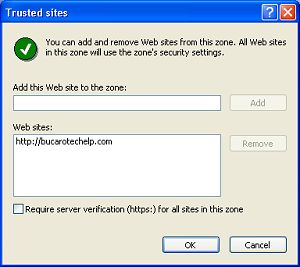
In the Trusted sites dialog box that appears, make sure the check box next to "Require server verification (https:) for all sites in this zone" is unchecked. Then, in the "Add this Web site to the zone:" text box, type the URL of a site you trust (including the http://) and click on the [Add] button.
Similarly, select the "Restricted sites" zone, click on the [Sites...] button, and add the URL's of untrustworthy sites. I consider any site that promotes pirated software, business opportunity scams like MLM, pornography, or that generates advertising popup windows to be untrustworthy.

More Windows Tips:
• Disable Cutesy Effects to Speed Up Windows XP
• Diable Windows CD/DVD AutoPlay
• Steps to Fix a Wet Laptop
• Change Your PC's Name
• Use ReadyBoost to Improve PC performance
• Configuring Sound for Windows Events
• Record Your Own Windows Startup Greeting
• Free Goodies for Your PCs
• OpenOffice a Software Solution to Enhance your Office Productivity at No Cost
• Capture the Computer's Screen With the Print Screen Key