
When you open the Start menu, it provides a menu item to display a list of all the files that you have recently opened. Although this can be handy if you want to work on those files again, it can also allow others who use your computer to trace your activities.
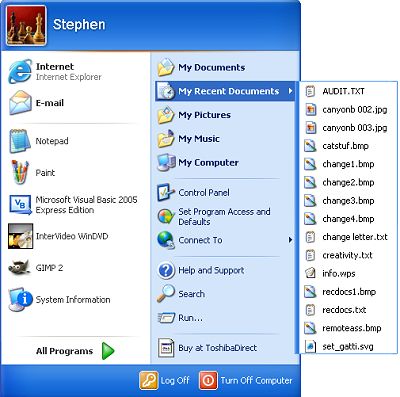
To remove the "My Recent Documents" menu item from the Start menu:
1. Right-click on the Start button and, in the popup menu that appears, select "Properties".
2. In the "taskbar and Start Menu Properties" dialog box that appears, select the "Start Menu"
tab. On the "Start Menu" tab, the "Start Menu" radio button should be set.
3. On the "Start Menu" tab, click on the [Customize...] button.
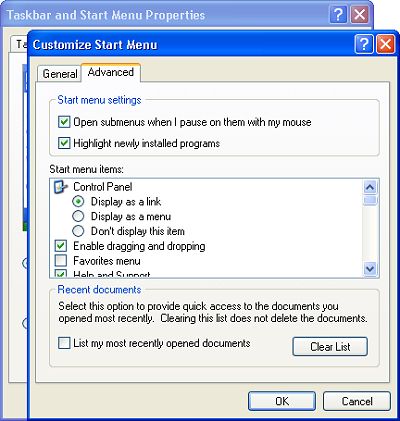
4. In the "Customize Start Menu" dialog box that appears, select the "Advanced" tab.
5. On the "Advanced" tab, at the bottom of the dialog box, uncheck the checkbox next to
"List my most recently opened documents.
6. Click on the [OK] button in both boxes to close them.
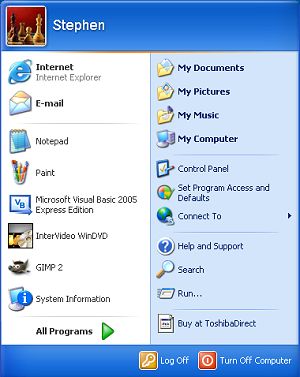
Next time you open the Start menu, the "My Recent Documents" menu item is gone.
• Note: Don't get confused by the Start menu's "My Documents" item, which does not display your most recently opened documents, instead it's a shortcut to your My Documents folder.

More Windows Tips:
• Create Your Own Custom Screen Saver with Windows Built-in Slideshow
• How to Add and Remove Desktop Gadgets
• How to Hide Files in Windows 7
• Vista - Restore Deleted Recycle Bin
• Disable Hibernation in Windows 7
• How to Use Windows 7 Built-in Speech Recognition
• Configure the Start Menu
• Cover Your Tracks in Internet Explorer
• Remove My Recent Documents from the Start Menu
• Know Your Keyboard Shortcuts