
One of the biggest benefits of a GUI (Graphical Users Interface) is the fact that you don't need to type everything, many of your tasks can be accomplished by simply clicking on a mouse key. The standard mouse has two buttons, the left button is used to select, open, close, and move elements of the interface, and the right button is used to open context menus. But what if you're a "left-handed".
About 12 percent of the population is left-handed and they are usually forced to function in a right-handed world. Fortunately, Windows lets you swap the functions of the mouse buttons. It's important to let left-handed people be as productive as possible because, on average, left-handed people are more creative than right-handed people. That's why occupations like designer and architect have a higher percentage of left-handed people than the general population.
To swap mouse buttons:
1. Select Start | Settings | Control Panel and open the Mouse utility.
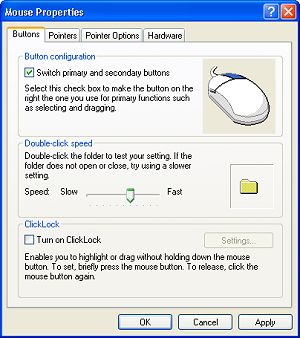
2. In the Mouse utility, select the "Buttons" tab.
3. On the "Buttons" tab, in the "Button Configuration" section, set the checkbox
next to "Switch primary and secondary buttons".
4. Use the right mouse button to click on the [Apply] button, and then on the [OK] button.
After swapping the functions of the mouse buttons things might seem a little strange. It might take even a left-handed person some time to get used to it. Then you have to deal with the fact that you'll need to use the opposite button called for in all computer documentation and articles, including the ones on this website.

More Windows Tips:
• Change the Default Program for a File Type
• Save Ink When Printing
• How to Set up an Ftp Server on Windows Xp Professional
• What is Airplane Mode?
• Capture the Computer's Screen With the Print Screen Key
• Headphones: earbuds, on-ear, over-ear. What's the Difference?
• Change a Drive Letter
• Window 10 Power Management
• How to Add and Remove Desktop Gadgets
• Put a Shut Down Button on Your Desktop