
You start your computer and receive the message "Windows Shutdown abnormally". This might be because the last time you Shutdown Windows and turned off the power, you actually put Windows to Sleep and turned off the power. The default action for Vista's Shutdown dialog box is Sleep.
Why is the default action for the Shutdown menu Sleep? Because Vista is constructed on the same antiquated bloated band-aid code that Microsoft has been using for decades. Every new version of Windows takes longer to shutdown and longer startup. Microsoft figures they can hide this fact by keeping the power on and a large portion of the operating system in memory.
Unfortunately the Internet is riddled with complaints from people that their system doesn't work when they "wake" it, or it doesn't wake at all. Fortunately it's easy change Vista's default Start menu Shutdown to actually "Shutdown".
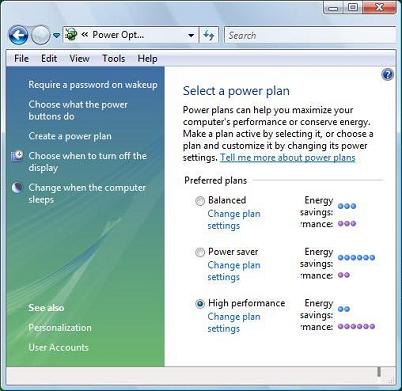
In Control Panel's "System and Maintenance" group, select Power Options. In the Power Options utility, in the list of "Preferred plans", under the name of the plan with it's radio button set, click on the "Change plan settings" link.
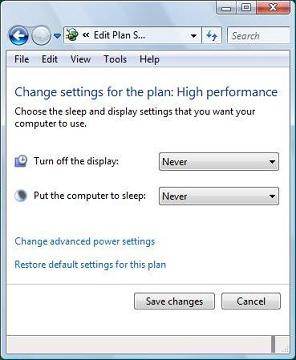
In the Change settings for the plan: ... dialog box which appears, click on the "Change advanced power settings" link.
In the Power Options dialog box which appears, expand the "Power buttons and lid" branch, and then expand the "Start menu power button" and in the drop-down list of options that appears, select "Shut down".
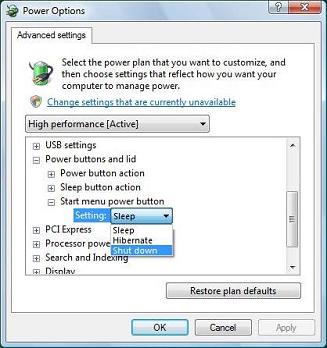
Click on the [Apply] button, then click on the [OK] button. Close the Change settings for the plan: ... dialog box.
Now next time you select Shutdown in the Start menu, the default action for the Sutdown dialog box will actually be Shutdown.

More Windows Tips:
• Backup Your Windows XP Activation Files
• How to Cancel a Print Job in Windows 10
• Customize the Quick Launch Toolbar
• Remove Windows Components You Don't Need
• Google Apps vs Microsoft Office 365: Which is Best for Your Business?
• How To Build A Mortgage Calculator For Free in Microsoft Excel
• How to Restore Files from File History in Windows 10
• Keep Laptop Running when You Close Display in Windows 7
• Why My Office Files Do Not Open
• Create a Shortcut to Task Manager