
Write protecting a file prevents anyone, including you, from editing or accidentally deleting the file. Follow the steps below to write protect a file.
1. In Windows Explorer, navigate to the file and right-click on the file's name. In the popup menu that appears, select Properties.
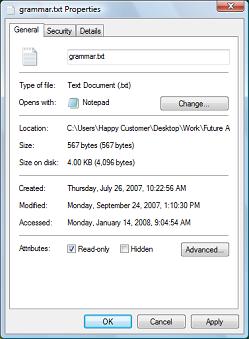
2. In the file's Properties dialog box, on the General tab, at the bottom of the page, set the [x] read-only check box.
3. Click on the [OK] button.

More Windows Tips:
• My Favorite Windows 7 Tips and Tricks
• How to Repair a Damaged Excel File
• Put a Shut Down Button on Your Desktop
• Display Control Panel Utilities in Windows 7 Start Menu
• How to Remove Metadata From Files in Windows 7
• Uninstall Windows Live Messenger From Windows 7
• Customize Internet Explorer's Security
• Add a Folder to the Windows 7 Taskbar
• How to Transfer a File From PC to Kindle
• Vista - Display Multiple Clocks on Your Desktop