
If you accidentally or purposely deleted the Recycle Bin icon from your desktop, or if it disappeared for unknown reasons, you can easily get it back. To restore the Recycle Bin icon to your desktop, follow the steps below.
1. Right-click on a blank space on your desktop and, in the popup menu that appears, choose Personalize.
2. In the "Personalize appearance and sounds" windows that appears, in the left pane, Click on "Change desktop icons".
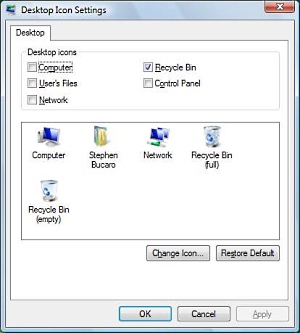
3. In the "Desktop Icons Settings" dialog box, set the checkbox next to "Recycle Bin" and click on the [OK] button.

More Windows Tips:
• Associating File Types
• Google Apps vs Microsoft Office 365: Which is Best for Your Business?
• Put a Shortcut to Create a Restore Point on Your Desktop
• Configuring Sound for Windows Events
• Single-click to Open Applications and Files
• Remove Windows Components You Don't Need
• Windows 10 Disable Aero Snap and Shake
• Disable Windows 7 Wireless Configuration Manager Service (WLAN AutoConfig)
• How to Transfer a File From PC to Kindle
• Change Explorer's Thumbnail Size