Has your CD-ROM/DVD-ROM drive eaten a CD/DVD, and you can't get it out? If you want to take that CD/DVD out of your CD-ROM, and the Eject button isn't working, follow the steps below to get the disc of your drive.
Welcome to Bucaro TecHelp!

Welcome to Bucaro TecHelp!
Maintain Your Computer and Use it More Effectively
to Design a Web Site and Make Money on the Web

[About BTH]  [User Agreement]  [Privacy Policy]  [Site Map]  [Contact Form]  [Advertise on BTH]  [News Feed]

Google
Web
This Site
   WARNING!
What you learn from these Totally FREE
Einstein Newsletters could cause your friends to mistake you for someone else!
  [] automobiles
  [] business
  [] parenting
  [] computers
  [] contests
  [] education
  [] entertainment
  [] food/wine
  [] free stuff
  [] genealogy
  [] health/fitness
  [] home/garden
  [] humor
  [] marketing
  [] investing
  [] pets
  [] inspiration
  [] self-improve
  [] recreation
  [] travel
  [] womens stuff
  [] writing/reading
Click here and choose as many as you like!

How to Remove a DVD or CD that's Stuck in the Drive

Has your CD-ROM/DVD-ROM drive eaten a CD/DVD, and you can't get it out? If you want to take that CD/DVD out of your CD-ROM, and the Eject button isn't working, follow the steps below to get the disc of your drive.

1. Locate a standard wire paperclip and unbend one side of it.
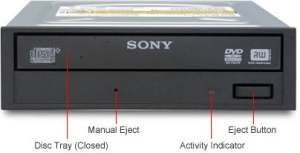
Manual Eject hole

2. Locate the Manual Eject hole, a small pinhole near the drive door.

3. Insert the paper clip in the hole, pushing it in firmly to release the spring-loaded latch.

4. When the door pops open, pull on the drive bay, but don't force it, until it's open far enough so that you can remove the disc from the drive.

Computer Sections

RSS Feed RSS Feed

Windows Tips
Vista - Display Multiple Clocks on Your Desktop
Create a Shortcut to Task Manager
Move an Off Screen Window Back into View
Make the Insertion Point Cursor More Visible
Turn Off the User Account Control
Disable Media Player Network sharing
Disable Taskbar Button Grouping
Synchronize Your Computer's Clock With an Internet Time Server
Change Vista's Start Menu Shutdown Option
Change Internet Explorer's Default Search Engine
Add More Information to a Files List
Vista - Restore Deleted Recycle Bin
Backup Your Windows XP Activation Files
Disable "Hard Disk Turn Off" to Speed Up Windows XP
Disable Cutesy Effects to Speed Up Windows XP
How to Remove a DVD or CD that's Stuck in the Drive
Capture the Computer's Screen With the Print Screen Key
Put a Shut Down Button on Your Desktop
Change a Drive Letter
Change the Mouse Pointer
Change Explorer's Thumbnail Size
Cover Your Tracks in Internet Explorer
Configure the Start Menu
Configure Folder Options
Configure Windows Taskbar
Customize Internet Explorer's Security
Customize the Quick Launch Toolbar
Delete Does Not Erase a File
Record Your Own Windows Startup Greeting
Create Your Own Custom Taskbar Toolbar
Configuring Sound for Windows Events
Desktop Shortcuts Give Quick Access to Applications and Folders
Diable Windows CD/DVD AutoPlay
Remove My Recent Documents from the Start Menu
How to Fully Customize your Desktop
How to change a Folder's Icon
How to Change Your Computer's Name
How-to Capture the Computer's Screen
How to Connect Two Computers
How to Fax Documents Using Windows XP
How to Fix a Scratched CD
How to Write Protect a File
Introducing Screensavers
OpenOffice a Software Solution to Enhance your Office Productivity at No Cost
Create Your Own Custom Screen Saver with Windows Built-in Slideshow
Put a Help and Support Center Shortcut on Your Desktop
Uninstall Windows Media Player 10 and Start Enjoying Your Media Again
The Secret to Passing the Microsoft Office Specialist Exams
Show Desktop Gives Quick Access to Desktop Icons
Windows Desktop Themes
Swap Mouse Buttons
Windows Mouse Dead? - How to Get Around Windows Without the Rodent
Save Ink When Printing
How To Build A Mortgage Calculator For Free in Microsoft Excel
How to Create a Microsoft Excel Database
How to Repair a Damaged Excel File
Why My Office Files Do Not Open

TigerDirect
[Site User Agreement]  [Advertise on This site]  [Search This Site]  [Contact Form]
Copyright©2001-2007 Bucaro TecHelp P.O.Box 18952 Fountain Hills, AZ 85269