You've made a bunch of changes to a file, but now you feel it's all wrong. You may be able to go back to a previous version. Depending upon how it's configured, Window's System Restore feture may have, without you knowing, saved a previous version of your file.
Welcome to Bucaro TecHelp!

Welcome to Bucaro TecHelp!
Maintain Your Computer and Use it More Effectively
to Design a Web Site and Make Money on the Web

About Bucaro TecHelp About BTH User Agreement User Agreement Privacy Policy Privacy Site Map Site Map Contact Bucaro TecHelp Contact Advertise on Bucaro TecHelp Advertise Here RSS News Feeds News Feeds


Computer Repair with Diagnostic Flowcharts

Troubleshoot PC Hardware Problems With Flowcharts

This manual for troubleshooting PC hardware problems creates a visual expert system for diagnosing component failure and identifying conflicts.

The seventeen diagnostic flowcharts at the core of this book are intended for the intermediate to advanced hobbyist, or the beginning technician.

Click Here

Restore a File's Previous Version

You've made a bunch of changes to a file, but now you feel it's all wrong. You may be able to go back to a previous version. Depending upon how it's configured, Window's System Restore feture may have, without you knowing, saved a previous version of your file.

Follow the steps below to see if it's possible to go back to the previous version.

1. Right-click on the file's name and choose Properties in the popup menu that appears.
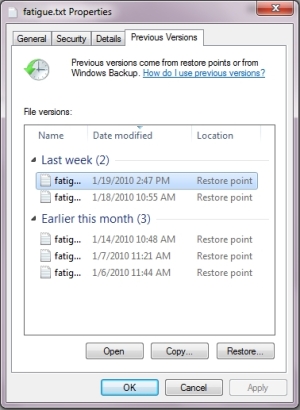
File Properties dialog box

2. In the file's Properties dialog box that appears, click on the Previous Version tab.

3. The message box may display the message "Searching for previous versions...". If a list of previous versions appears, double-click on a previous version in the list to open it in it's related application.

4. You can now save the previous version with the same name to over-write the current version, or you can save it with a different name.

More Windows Tips:
• How-to Capture the Computer?s Screen
• Move an Off Screen Window Back into View
• Uninstall Windows Media Player 10 and Start Enjoying Your Media Again
• Remove My Recent Documents from the Start Menu
• Most Useful Keyboard Shortcuts
• Display Control Panel Utilities in Windows 7 Start Menu
• Swap Mouse Buttons
• My Favorite Windows 7 Tips and Tricks
• How to Configure Windows 7 Autoplay
• Why My Office Files Do Not Open


RSS Feed RSS Feed

Google Reader or Homepage
Add to My Yahoo!

Add to My AOL
Add to Technorati Favorites!

Computer Sections


TigerDirect
[Site User Agreement] [Advertise on This site] [Search This Site] [Contact Form]
Copyright©2001-2011 Bucaro TecHelp 13771 N Fountain Hills Blvd Suite 114-248 Fountain Hills, AZ 85268