
USB drives operate slower than the PC's hard disk drive. One reason for this is because many people remove their USB drive by simply unplugging it. This makes it unwise to use a write cashe with a USB drive. A write cache means when you save a file it will not necessarily be immediately written to the USB drive, instead files will be cached until the cache reaches a predetermined size, or until you dismount the drive, then everything will be written at once. However in Windows 7 you can configure a write cashe for your USB drive.
1. Open Control Panel and Click on the System and Security link. Under System, click on Device Manager.
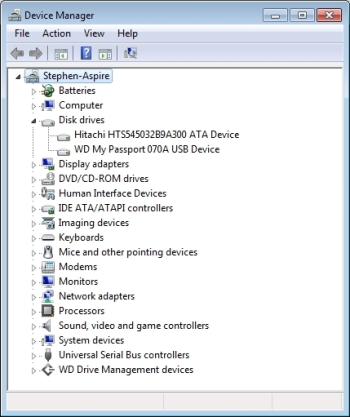
2. In Device Manager, expand the Disk drives branch, right-click on the USB disk icon and in the popup menu that appears select Properties.
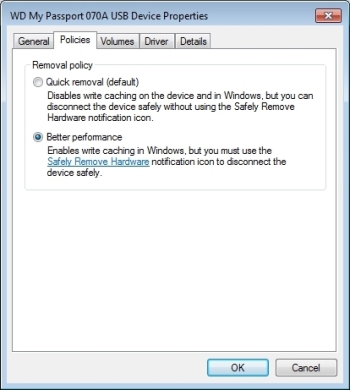
3. In the USB disk Properties dialog box, on the Policies tab, set the "Optimize for performance" radio button, then click on the [OK] button.
This enables write cashing, however in this mode to remove the drive, you can't just unplug it, you have to remove it by clicking on the devices icon in the notification area. Each time you plug in your USB drive you'll need to reconfigure it to use a write cache.

More Windows Tips:
• Disable Taskbar Button Grouping
• Windows 10 Keyboard Accessibility Settings
• How to change a Folder's Icon
• Put a Shortcut to Create a Restore Point on Your Desktop
• Associating File Types
• How to Change Your Computer's Name
• Change Your PC's Name
• Change Vista's Start Menu Shutdown Option
• Introducing Screensavers
• The Secret to Passing the Microsoft Office Specialist Exams