
Does your computer run as fast as it did the first day you brought it home from the store? If you have been using it for several months or more, more than likely it has begun to operate more slowly. There can be many causes for this, for example too many processes running simultaneously, or invasion by spy ware or a virus. But the most common cause is a fragmented hard disk.
First let's understand what disk fragmentation is. A hard disk is constructed of disk shaped platters with a magnetizeable coating their surface. As the platters spin at a very high speed, tiny coils skim over the surface of each platter reading and writing data. Each of the circular paths on a platter is called a "track". An arch section of a track is called a "sector".
When a file is written, it is written to the first unused sector on the disk. When your computer was new and all the software was consecutively written to the hard drive, your hard drive looked similar to that shown below.
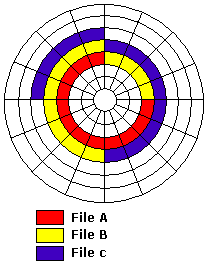
While using your computer, you delete file A, write file D, and Enlarge file C and File A. This causes the data on your hard disk to be arranged as shown below.
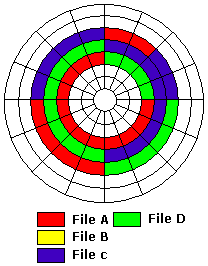
Now you can see that in order to read file A from the hard disk, the read coil has to search and skip for the scattered bits of the file. As files are written, deleted and rewritten in different size, unused blocks of space become discontiguous. Parts of individual files become scattered across the disk. Your computer takes longer to load applications and data files.
And this is a simplified diagram, image how a real hard disk with hundreds of thousands of files looks after months, or even years of removing and rewriting files. That's why it's important to defragment your hard disk occasionally. Use the following step-by-step plan to defragment your hard disk today.
1. Use Control Panel's Add/Remove Programs utility to uninstall any software applications that you no longer use.
2. Delete any data files that you don't need. If you have a lot of data files that are questionable, archive them to a CD-R.
3. Use Start | Programs | Accessories | System Tools | Disk Cleanup to delete any cached Internet files, temporary files, and other junk.
4. In Windows 98/Me, use Start | Programs | Accessories | System Tools | ScanDisk to locate and repair any damaged files.
5. If an application writes to the hard disk during defragmentation, Disk Defragmenter will start all over again. You need to shut down any unnecessary running applications. Press Ctrl-Alt-Delete to open Task Manager and see if any Applications are running.
In Windows 89/Me the only tasks you need running are Systray and Explorer. Windows 2000 doesn't list Systray and Explorer in Task Manager, so you can shut down any applications listed. Select the name of the application and click on the End Task button. You are now ready to start Disk Defragmenter.
6. On a large hard disk defragmentation can take a long time, so make sure you start Disk Defragmenter at a convenient time when you will not need to use the computer. Select Start | Programs | Accessories | System Tools | Disk Defragmenter.
In Windows 98/Me click on the Show Details button to view an amazing graphical display of the defragmentation process in action. While it's not very productive to sit and watch this display, it is very interesting, and you might make up the time by having a faster computer afterwards.

More Maintain and Upgrade Your PC Articles:
• How to Backup Your Hard Drive
• Installing An Optical Drive Guide
• How to REALLY Backup the Windows Registry
• Satellite Internet Service Basics
• Printers - A Practical Buyers Guide
• Five Maintenance Tips to Resolve Your PC's Performance Issues
• How To Properly Install A New Motherboard
• Digital Photography Printing - Simplifying the Pixels and DPI's
• What's the Difference Between DDR1 DDR2 and DDR3?
• Disable Windows Automatic Update