
Forget about emptying your wallets every time you see the blinking light. Quit worrying and start doing it yourself! It’s an easy process that won't take you more than five minutes.
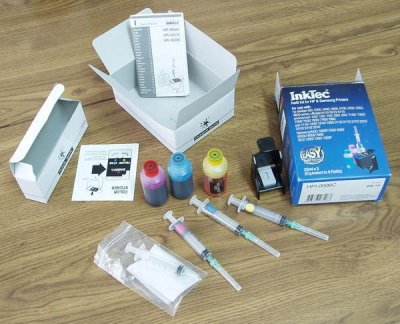
The following is included in a typical ink refill kit: ink bottles, syringes and detailed instructions. Some kits include an air balance clip for balancing the air inside the cartridge to ensure proper ink flow. Some kits also include hand-drill tool to make a hole in the top of your empty cartridge.
Refilling Process
1. To start the refilling process, fill the syringe with one of the ink colors over the sink or several sheets of scrap paper to prevent any mess. Different printers hold different amounts of ink. In most Epson printers, the black cartridge holds approximately 17 ml and the color cartridges hold approximately 8 ml. See the instructions with your refill kit to see how much ink your cartridges can hold.
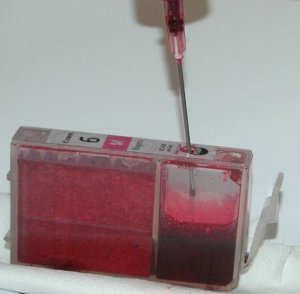
2. Before inserting the needle, make a small hole in the top of the cartridge (one for each color chamber). The hole is at the top of the cartridge near the label. Simply push the needle through the hole and press to the bottom of the cartridge towards the outlet hole. It’s important to fill the cartridge slowly so as to avoid the ink from foaming and introducing air in the chamber.
3. You do not need to seal the refill holes since there are already breather holes on the top of the cartridge.
4. Any unused ink can be put back in the bottle. You should clean the syringe with water and dry it properly to do the same process for the other cartridges or for future use. You can also label each syringe for the different colors so that each syringe is only used with one color.
5. Once you place the cartridge back in the printer, run the cleaning cycle 1 to 3 times. If there are any gaps in the printing, run the cleaning cycle again.
Don't Forget
There are a few things to remember when refilling your cartridge. It should be efilled before the cartridge is completely empty to avoid the chamber from drying out and clogging. Also, it is a good idea to let the printer cartridge sit for a few hours (or overnight) so that the pressure in the cartridge will stabilize.
Some printers, like newer Epson models, have a green chip on their ink cartridges which is visible by looking at your cartridge. They are often referred to as "Intellidge" cartridges. The chip keeps track of how often the cartridge is used and lets the computer know when the cartridge may be low or empty. As long as you reset the chip, refilling the cartridge with ink from a refill kit will not be a problem. A resetting tool can be used to reset the memory on the chip. This allows the printer to recognize the cartridge as being full which makes printing with a refilled cartridge possible.
Refilling your own ink cartridge is easy, good for the environment, and very good for your pocket.
A recent grad from Concordia University's English Department, Marisa uses her computer technology skills along side her writing skills to be the webmaster for [printpot.com domain for sale] Sharing her interest and expertise about ink jet refill kits has helped convince many of the advantages of refilling rather than discarding empty cartridges.


More Maintain and Upgrade Your PC Articles:
• A Simple Guide To Installing Laptop Memory
• How to Maintain Accurate Time on Your PC
• Webcam Basics
• FREE Ebook - How to Configure and Maintain Your PC
• Guide to Getting the Most from Laptop Batteries
• Create Your Own Super Control Panel
• Turn Off Windows XP Service Pack 2 Firewall
• FREE Software - My Control Panel
• Watch and Record Standard and High Definition TV on Your PC
• Windows 7 Action Center Lets You Control Alerts