
To make your Windows operating system more reliable, disable automatic Windows Update. I know that sounds counter intuative and against all the copy-cat advise you read, but it's true. If you don't beleive me, just google the phrase "windows update causes problems" and you'll receive over 50 million results, many of them being Microsoft Service Bulletins.
• Many times an Update will cause more problems than the problem it was supposed to fix.
Occationally Windows Update itself fails, leaving your system in an unstable, if not unbootable state. Frequently, after an update, some applicationsstop working, including Microsoft's own applications (Microsoft HTML Help Workshop being a recent example). About a week after Windows XP SP2 was released, Microsoft revealed a long list of programs that the update is known to cause problems with.
• The reason Windows needs updates is because Microsoft releases their products before they're finished. So why in the world would you expect, under the publicity of the discovery of another security hole, Microsoft to NOT release an update before it's finished?
Instead of allowing Windows Automatic Update, wait a few weeks after the release of an update to see the results received by early updaters. After the update has shown itself to be safe, or after Microsoft has fixed the update, then (by selecting Windows Update in the Start menu).
• If you have a dial-up internet connection Windows Update, automatic or manual) is an exercise in frustration.
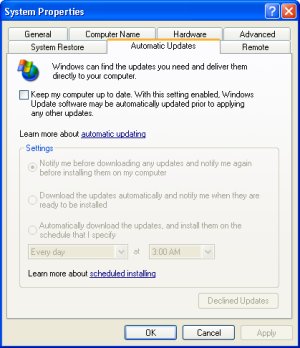
The default setting is to have Windows XP automatically scan for updates. To disable Windows Automatic Update, open Control Panel's System utility. In the "System Properties" dialog box, click on the "Automatic Updates" tab. Uncheck the box next to "Keep my computer up to date...". Then click on the [OK] button.
• Whether you allow automatic updates, or perform manual updates, it's very important to have an up-to-date firewall, anti-virus, and anti-adware applications running on your system. This is your first line of defense.
Don't let your self be unpleasantly supprised when your system automatically install Windows Updates that cause your applications to stop working. Instead, disable Windows Automatic Update and, a few weeks after an update has shown itself to be safe, perform a manual upate.

More Maintain and Upgrade Your PC Articles:
• Guide to Getting the Most from Laptop Batteries
• How to Use Windows Defender
• Tuning-up Windows XP Computer
• Laptop Batteries 101 - A Buyer's Guide
• Guerrilla Overclocking Primer
• Clean-up Your PC
• Avoid Cancer by Using USB Wired Keyboard and Mouse
• Create Your Own Super Control Panel
• Printers - A Practical Buyers Guide
• An Uninterruptible Power Supply Can Save Your PC