
What is a Power Supply?
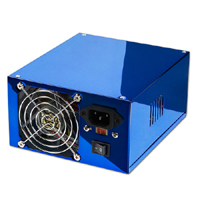
A computer power supply unit (Computer PSU) is the component that supplies power to a computer. More specifically, a power supply is typically designed to convert 100-120 V (North America and Japan) or 220-240 V (Europe, Asia and Australia) AC power from the mains to usable low-voltage DC power for the internal components of the computer. Some power supplies have a switch to change between 230 V and 115 V. Other models have automatic sensors that switch input voltage automatically, or are able to accept any voltage between those limits.
The most common computer power supplies are built to conform with the ATX form factor. The most recent specification of the ATX standard is version 2.2, released in 2004. This enables different power supplies to be interchangeable with different components inside the computer. ATX power supplies also are designed to turn on and off using a signal from the motherboard (PS-ON wire), and provide support for modern functions such as the standby mode available in many computers.
Computer power supplies are rated based on their maximum output power. Typical power ranges are from 300 Watts to 500 Wats (lower than 300 Wats for Small form factor systems), although units used by gamers and enthusiasts usually range from 500 Watts to 1000 Watts, with the highest end units going up to 2 kiloWatts for extreme performance computers with multiple processors and graphics cards (ATI CrossFire or NVIDIA SLI).
Most computer power supplies have the appearance of a square metal box, and have a large bundle of wires emerging from one end. Opposite the wire bundle is the back face of the power supply, with an air vent and C14 IEC connector to supply AC power. There may optionally be a power switch and/or a voltage selector switch.
A label on one side of the box lists technical information about the power supply, including safety certifications maximum output wattage. Common certification marks for safety are the UL mark, GS mark, TÜV, NEMKO, SEMKO, DEMKO, FIMKO, CCC, CSA, VDE, GOST R and BSMI. Common certificate marks for EMI/RFI are the CE mark, FCC and C-tick. The CE mark is required for power supplies sold in Europe.
Dimensions of an ATX power supply are 150 mm width, 86 mm height, and typically 140 mm depth, although the depth can vary from brand to brand. Before replacing a power supply, be sure you know the capacity of the original case, so you buy a PSU that will fit.
How to Buy a Power Supply?
Most people tend to overlook the importance of their power supplies. That's because your power supply is far more than just an unassuming gray or black box that you plug into an outlet before you crank up your computer. Now that gaming machines, extreme PCs and fast, powerful workstations crave increasing amounts of reliable power, you can no longer afford to overlook the role that your power supply has in keeping your PC healthy and running to its full potential.
Few spend any time considering the power supply. Yet, when you build a system for the lowest possible price, the manufacturer is most likely to cut corners on components like the PSU. As a result, you need to be cautious when you buy a PC system. If you are paying attention to the power supply, there is a decent chance you are concerned mostly with how many watts of power it is rated to generate, even though there is little chance you will be able to verify those power ratings.
Unfortunately, many do not take the time to consider whether the power the supply produces is clean and stable, whether it is noisy, or if it is prone to system-jeopardizing spikes and surges, or just as important is the MTBF (mean time between failure) life span of the power supply!
The Increasing Demands on Power Supplies
It seems that only the PC connoisseurs, those putting together or purchasing extreme PCs or top-flight gaming systems, consider the power supply to be the heart and soul of the system and who always seek the best power supplies they can afford.
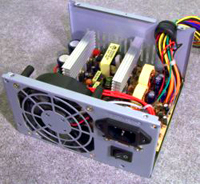
The power supply is important simply because it supplies electrical power to every other component in the system. Unfortunately, it's historically one of the components most likely to fail, especially because so many manufacturers cut corners on quality when adding power supplies to their systems.
It's sad to say that a power supply failure can cause components to malfunction as well as damage them beyond repair, by delivering improper or erratic voltage. As you add more and more peripherals to your PC system - extra hard drives, CD drives - anything that you plug into your motherboard - you put increasing strain on your power supply. The more strain the power supply must bear the more likely it is that you will have problems with inconsistent levels of power. When your system is deprived of a consistent stream of reliable power it will be prone to random hardware failures, bizarre errors that you may never have seen before (and which you certainly do not want to see), or even the untimely demise of your personal computer.
Yet despite the increasing importance of power supplies they are far from being the sexiest products in the computer supply catalogue or website. So when purchasing a new PC or Bare-Bones Chassis, pay careful attention to the power supply that is built-in, and chose the best power supply you can afford.
Get Familiar with Power Supply Terms
When you buy a PC or replacement power supply you should familiarize yourself about the power supply itself. Learn everything you can about it. The average consumer, however, tends to be intimidated by the vocabulary and complex statistics found in the specs. Here are a few common terms that can help make sense out of the specs.
• Mean Time Between Failures (MTBF) or Mean Time To Failure (MTTF).
This value represents the calculated average hour interval that the power supply is expected to perform before it fails, or simply put, the time between failures. Although power supplies will have MTBF ratings of 100,000 hours or more, be aware that these figures were not always discerned from actual real-time testing. Most manufacturers glean these totals based upon the comparative failure rates of the power supply's individual components. Regardless of the MTBF, a better quality power supply will use quality components, and be a more reliable predictor of actual life span.
• Overvoltage Protection.
Overvoltage Protection prevents a signal from being received if the voltage exceeds a certain limit. This helps prevent an electrical device from being overloaded and destroyed. Make sure the power supply you purchase includes overvoltage protection.
• Maximum Load Current.
Maximum load current is the greatest amount of current, expressed in amps, which can safely be delivered through a particular output. Maximum load current values are represented as individual amperages for each output voltage. With these figures, you can calculate not only the total amount of power the power supply can supply, but also how many devices using those various voltages it can support.
• Minimum Load Current.
The converse to maximum load current, minimum load current is the smallest amount of current (in amps) that must be drawn from a particular output for that output to function. If the current drawn from an output falls below the minimum, the power supply could be damaged or automatically shut down.
• Load Regulation.
When the current drawn from a particular output increases or decreases, the voltage changes slightly as well, usually increasing as the current rises. Load regulation is the percent change in output voltage as the load is changed from minimum to maximum, at constant line and constant temperature. The load change may be specified for other than no load to full load, such as 20% load to full load.
• Efficiency.
The ratio of power that goes into a supply as opposed to how much goes out if it. This value is expressed in percentile, with the most common being within the range of 65 - 85 percent in today's power supplies. Be sure to purchase a power supply that falls within this range - the higher, the better! However, although greater efficiency translates to less heat inside the computer, which is something you should always strive for, precision, stability, and durability are more important factors.
How Much Power Do I Need?
How much power is necessary for the "average" PC system, if there is such a thing nowadays? Take a look at what you've had in the past. If you bought a standard power supply from one of the top computer manufacturers, chances are you purchased a 250- to 300W power supply of average quality. Now that is more than enough for your run-of-the-mill system consisting of a hard drive, an optical drive and a fair-to-middling graphics card. However, if you are going to add more peripherals you need to seriously consider upgrading your power supply.
For your reference, following is a chart that illustrates approximately how much wattage you will need to run various common components in a PC system:
| Component | Wattage Required |
| Motherboard | 15-30 |
| Low-end CPU | 20-50 |
| Midrange to high-end CPU | 40-100 |
| RAM | RAM 7 per 128MB |
| PCI add-in card | 5 |
| Low to midrange graphics board | 20-60 |
| High-End graphics board | 60-100 |
| IDE hard drive | 10-30 |
| Optical drives | 10-25 |
The Advantages of a Higher End Power Supply
When you purchase a better power supply you will markedly decrease the amount of noise your computer makes when it's on. The fan that cools your power supply has to be a heavy performer to achieve its appointed task. Therefore, it's one of the biggest, noisiest fans in your PC. And it's strategically located in front of the vents that lead to the outside of your computer case. So, it makes a noticeable noise, one that can become irritating over time.
A new, more efficient, more powerful power supply will deliver more power, regulate it at a more even level and at a reduced noise level. For you PC builders, be aware that some of the inexpensive cases often come with cut-rate power supplies that may not be up to the task of powering a high-end PC. Some of the more expensive models do not come with a power supply, which give you the opportunity to choose your own.
If you've added a lot of new components to your PC, you may be overtaxing your existing power supply, so look at getting a bigger, better one. Power supplies can cause problems - including random crashes or even component failure - if they are asked to produce more power than they are designed to generate. Reputable manufacturers will typically include a chart of acceptable components.
Finally, Make Sure Your New Power Supply is Compatible with Your Computer
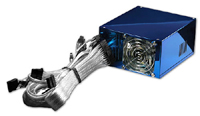
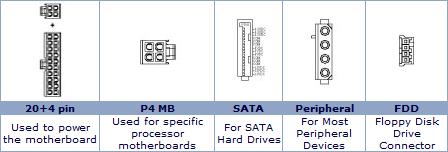
Beware - you must make sure your power supply is compatible with your system before you plug it in. Some computers use a special plug that links the power supply to the motherboard. If you use the wrong plug you can wind up literally torching your computer!
Power Supply Connections
Keeping Your Power Supply and Your Computer Cool
One of the most overlooked aspects of a PC Power Supply is that is also provides most of the PC's cooling. The fan in the power supply delivers most of the airflow inside your computer chassis. Therefore, not only is it important to have reliable power, but you also need a reliable fan, and one capable of producing the airflow needed to keep your components cool.
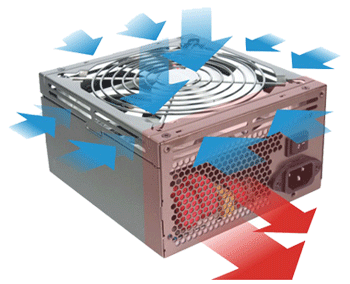
With today's higher speed processors, video cards, and drives, thermal regulation is critical. Components fail when over heated. So buying a power supply with a high capacity fan can literally save your system.
Many PSU manufacturers also offer variable speed fans that increase fan speed when heat builds up inside your computer. This is an important feature, and one that should be looked for. Also, look for the lowest noise level, since the Power Supply fan is responsible for 90 percent of the noise produced by your PC.
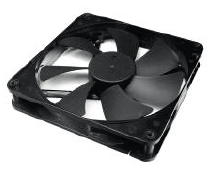
A Standard Box Fan
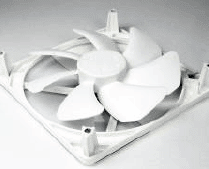
Newer Open Fan Design That Produces More Airflow.

More Maintain and Upgrade Your PC Articles:
• Installing An Optical Drive Guide
• Windows 7 Action Center Lets You Control Alerts
• How and When to Upgrade Your Sound Card
• Uninterrupted Power Supply (UPS) - Backbone of Your Small Business
• FREE Ebook - How to Configure and Maintain Your PC
• Partitioning Your Hard Disk
• How to Use Windows Defender
• How to Backup Windows XP Home Edition
• How to Protect Your Electronics from Electrical Surge Events
• Printing Troubleshooting Guide