
What is the confusion about RAM? Most computer users do some research before upgrading their system so they exactly know about a perfectly matching CPU, motherboard and video card combination that will meet all their needs. But most of them fail when it comes to RAM.
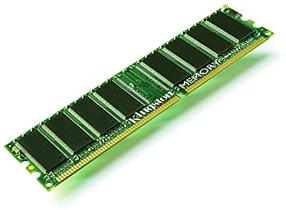
They just know the size of the RAM i.e. 1GB, 2GB or 4GB, but they don't know what this DDR1, DDR2 or DDR3 is all about. So that's why I came up with a this guide for buying a RAM, because it turns out that selecting the proper DDR variant is a very important factor that determines how your overall system will perform, thus every computer user should be well-advised to learn it.
DDR1 Specifications
DDR-DIM (Double Data Rate DIMM or DDR DIMM), or most popularly just plain DDR. Double Data Rate interfaces provide two data transfers per differential clock. The data becomes registered when the CK goes high (the + side), and /CK goes low (the - side). DDR1 utilizes the JEDEC standard for Double Date Rate (DDR I) SDRAM.
Like all DDR RAM it is available as registered or un-buffered. Registered DIMMs are generally known as FB-DIMMs and have their address and control lines buffered in order to reduce signal loading. FB-DIMMs are considerably more expensive than un-buffered DIMMs and are generally reserved for server use. There are very few enthusiast/prosumer/gamers utilizing FB-DIMMs in their CPU's.
Un-buffered DIMMs don't feature address lines and control line buffering, so they cost quite a bit less. However, they may be system-loading limited and are thus generally restricted in the number that can be fitted onto one system. You'll find that most un-buffered DIMMs these days can only be installed on one motherboard to a maximum of 4 x 1GB.
Buffered or registered DIMMs don't have these limitations and server boards can accommodate 8 x 1GB, 16 x 1GB or more. An interesting and largely unknown aspect of un-buffered DDR DIMMs is that they are able to operate one clock cycle faster then FB-DIMMs.
DDR2 Specifications
DDR2 memory is the second generation in DDR memory. DDR2 begins with a speed level of 400MHz as the lowest available while the 400MHz speed is actually the highest speed for DDR1. Therefore, DDR2 picks up where DDR1 leaves off. It's a bit strange but due to different latencies a 400MHz DDR1 will outperform a 400MHz DDR2, but the advantage returns to DDR2 as soon as the speed reaches the next step 532MHz, which DDR1 cannot reach.
DDR3 Specifications
DDR3 is the third generation in DDR memory. DDR3 begins with a lowest capacity level of 800Mbps and goes up to 1600Mbps with bus speed as high as 2000MHz. Higher performance with lower power consumption is the major benefit, since operating voltage is only 1.5V for DDR3 compared to 1.8V for DDR2. Lower heat is generated, which means that systems will run cooler. Ultimately the new technology will result in higher capacity modules: Up to 8GB modules (Using 4Gb Chips) to help lower server/workstation system costs.
Transfer Rates
Another confusion is that RAM is mostly referred in PC-number, so here are the Transfer Rates for the various DDRs:
DDR1 Transfer Rate
DDR SDRAM: Double Data Rate SDRAM (DDR200, DDR266, DDR333 are standard)
- PC1600 (DDR-200 SDRAM);
- Clock Speed: 100MHz, Data Rate: 200MHz, Throughput 1600MB/s
- PC2100 (DDR-266 SDRAM);
- Clock Speed: 133MHz, Data Rate: 266MHz, Throughput 2100MB/s
- PC2400 (DDR-300 SDRAM);
- Clock Speed: 150MHz, Data Rate: 300MHz, Throughput 2400MB/s
- PC2700 (DDR-333 SDRAM);
- Clock Speed: 166MHz, Data Rate: 333MHz, Throughput 2600MB/s
- PC3000 (DDR-366 SDRAM);
- Clock Speed: 183MHz, Data Rate: 366MHz, Throughput 2900MB/s
- PC3200 (DDR-400 SDRAM);
- Clock Speed: 200MHz, Data Rate: 400MHz, Throughput 3200MB/s
DDR2 Transfer Rate
DDR2 SDRAM: Double Data Rate SDRAM II (Quad Edge Clock Rate, 1.8v signaling), Second Generation
- PC2-3200 (DDR2-400 SDRAM);
- Clock Speed: 100MHz, Data Rate: 400MHz, Throughput 3200MB/s
- PC2-4300 (DDR2-533 SDRAM);
- Clock Speed: 133MHz, Data Rate: 532MHz, Throughput 4300MB/s
- PC2-5300 (DDR2-667 SDRAM);
- Clock Speed: 167MHz, Data Rate: 667MHz, Throughput 5300MB/s
- PC2-5400 (DDR2-675 SDRAM);
- Clock Speed: 167MHz, Data Rate: 667MHz, Throughput 5400MB/s
- PC2-6400 (DDR2-800 SDRAM);
- Clock Speed: 200MHz, Data Rate: 800MHz, Throughput 6400MB/s
DDR3 Transfer Rate
DDR3 SDRAM: Double Data Rate SDRAM III (Quad Edge Clock Rate, 1.5v signaling), Third Generation
- PC3-6400 (DDR3-800 SDRAM);
- Clock Speed: 100MHz, Data Rate: 800MHz, Throughput 6.40GB/s
- PC3-8500 (DDR3-1066 SDRAM);
- Clock Speed: 133MHz, Data Rate: 1066MHz, Throughput 8.53GB/s
- PC3-10600 (DDR3-1333 SDRAM);
- Clock Speed: 166MHz, Data Rate: 1333MHz, Throughput 10.67GB/s
- PC3-12800 (DDR3-1600 SDRAM);
- Clock Speed: 200MHz, Data Rate: 1600MHz, Throughput 12.80GB/s
Now it will be really hard to list down which RAM best fits which motherboard. Before buying the RAM you should research your CPU manufacturer's RAM recommendations and fit that exact type of DDR in it. You would be just as foolish in using a PC3-12800 DDR3-1600 with an AMD Sempron 2800+ as you would be to burden down your Intel QX6800 with a PC1600 DDR-200. Every CPU/chipset combo has its proper DDR fit, and you should find out exactly what they are and stick to them. If you fir a slower than recommended DDR to your system will terminate critical RAM functions and could slow your system.
Top Manufacturers
Here is the list of Some of the leading as buying a RAM from an unknown vendor would end up in warranty issues.
• Kingston
• Corsair
• Centon
• Crucial
If you follow these guidelines and thoroughly research the proper DDR for your system, you'll enjoy years of speedy and trouble-free computing. A little bit of study is a small price to pay! [getpcmemory.com redirected].

More Maintain and Upgrade Your PC Articles:
• Watch and Record Standard and High Definition TV on Your PC
• Configure Windows Defender on Windows 10
• Reloading Windows XP
• How to Maintain Accurate Time on Your PC
• Avoid Cancer by Using USB Wired Keyboard and Mouse
• Printer Cartridge Price Fixing
• Digital Photography Printing - Simplifying the Pixels and DPI's
• How to Backup Your Hard Drive
• Free Download Patch My PC Checks for Available Patches
• FREE Software - My Control Panel