Slow Log-on to ISP
By Stephen Bucaro
When you are connecting to an unknown network, you need to determine which network
protocol the other network uses, and you may need to log-on to the other network.
Common network protocols are NetBEUI, IPX/SPX, and TCP/IP.
NetBEUI (NetBIOS Extended User Interface) is a protocol that was used in Windows
For Workgroups (Windows 3.11) to provide peer-to-peer networking ability. To identify
computers on the network, it used the computers name (IP addresses had not been
invented yet). IPX/SPX (Internetwork Packet Exchange/Sequenced Packet Exchange) is
a protocol that was used by Novel Netware before TCP/IP was invented.
Today almost everybody uses TCP/IP (Transmission Control Protocol/Internet Protocol),
the protocol used by the Internet. But Windows 98 dial-up networking is configured by
default to check for the older protocols when you try to logon to your ISP. It also
checks if you need to logon to the network. That’s why it takes so long to logon to
your ISP.
To configure your dial-up connection to skip these checks, open MyComputer on your
desktop and double-click on the Dial-Up Networking folder. In Windows Me
Start | Dial-Up Networking, then right-click on the dial-up connection and select
Properties in the popup menu to open the Connection dialog box.
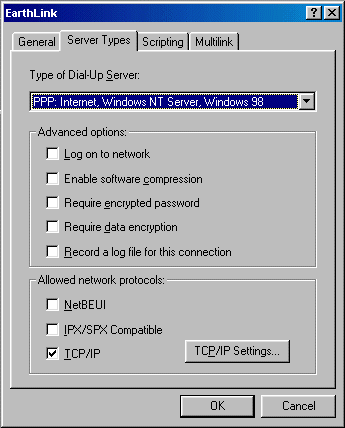
In the Connection dialog box select the Server Types tab, uncheck
Log on to network, NetBEUI and IPX/SPX . In Windows Me, select
the Networking tab and the Security tab for these checkboxes. Then click
on the OK button.
(Note how Microsoft shifts menu items around, calls it an upgrade and then charges you $100 for it.)
When I made this change to my Windows 98 system, my logon time was reduced from
over 60 seconds to less than 2 seconds. Make sure your computer’s dial-up connection
is not checking for obsolete networking protocols.
More Windows Troubleshooting Articles:
• How to Fix logoncli.dll Error
• Troubleshoot with Free Process Explorer Utility
• Undoing a Windows Update
• View Hidden Devices with Device Manager
• Troubleshoot Windows XP with Free Upgrade Advisor
• How to Fix Error "Can't Find NTLDR"
• How to Spot a Failing Hard Drive
• The Windows Recovery Console
• Video - Dell Laptop Motherboard Replacement Tutorial
• The Blue Screen of Death (BSOD)
| 

 About BTH
 User Agreement
 Privacy
 Site Map
 Contact
 News Feeds


 RSS Feed
 Follow @Stephen Bucaro
 Windows Troubleshooting
 Free PC Technical Support


