Buffer Underrun and Overrun Scenarios
By Stephen Bucaro
Buffer underrun and buffer overrun are occurrences that can result in some very
frustrating errors. This is not a "how-to" article about fixing buffer underrun and
buffer overrun errors, but a basic description of what a buffer is, why we need
buffers, and what causes buffer underrun and buffer overrun.
Buffer Underrun
The most common occurrence of buffer underrun is CD recorders. Let's imagine an
example of a CD recording session. The computer has an ATA hard drive capable of
transferring data at a rate of 8 MBps (Mega Bytes per second). The CD recorder has
a recording rate of 8 MBps. Everything should work fine, right?
Note: The data transfer rates mentioned in this article do not apply to any
specific device. They're just for purposes of discussion.
The 8 MBps specification for the hard drive is for "burst" mode. In other words,
it can transfer data at a rate of 8 MBps for only a few seconds. Then the transfer
rate drops much lower, and if the hard drive hasn't been maintained, for example it
has not been defragmented recently, the transfer rate can drop even lower.
Whereas a hard drive can skip from cluster to cluster while reading and writing,
a CD recorder must burn the data track in a continuous stream without stopping. The
design of a CD recorder requires a "sustained" transfer rate.
When two devices that operate at different transfer rates must communicate, we
can make them work together by placing a buffer between them. A buffer is a block
of memory, like a bucket for bytes. When you start the CD recording session, the
hard drive begins filling the buffer. When the buffer is almost full, the CD recorder
begins drawing bytes out of the buffer.
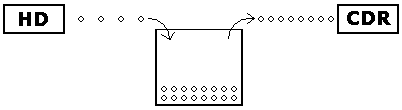
If everything goes smoothly, the hard drive will be able to keep enough bytes in
the buffer so that the speedy CD recorder won't empty the buffer. If the buffer runs
dry, the CD recorder has no data to burn into the CD, so it stops. Buffer underrun error.
We can reduce the chances of buffer underrun by configuring a larger buffer. Then
the hard drive will be able to put more bytes in the bucket before the CD recorder
starts drawing them out. However, sometimes you can't increase the size of the buffer
because the computer doesn't have a large amount of RAM installed. When the computer
needs more RAM, it uses "virtual" RAM. That is, it allocates part of the hard disk and
pretends like that's RAM. Now, even though you've increased the size of the buffer,
you have caused the hard drive to work even slower.
| 

 About BTH
 User Agreement
 Privacy
 Site Map
 Contact
 News Feeds


 RSS Feed
 Follow @Stephen Bucaro
 Windows Troubleshooting
 Free PC Technical Support


