
If the Windows desktop does not take up the entire display, or if the screen is at too low a resolution (icons on your screen are very large), the problem may be an incorrect video driver.
• If the screen resolution is too low (or too high) first try selecting a new resolution. In the Start menu select Settings > Control Panel. In Control Panel select the Display utility. In the Display utility, select the Settings Tab.
A video driver is the software that links the operating system to a particular mother board video circuit or display adapter (video card). To troubleshoot the video driver, first locate the video circuit in Device Manager.
1. In the Start menu, select Settings > Control Panel
2. In Control Panel, double-click on the System icon to open the System Properties dialog box.
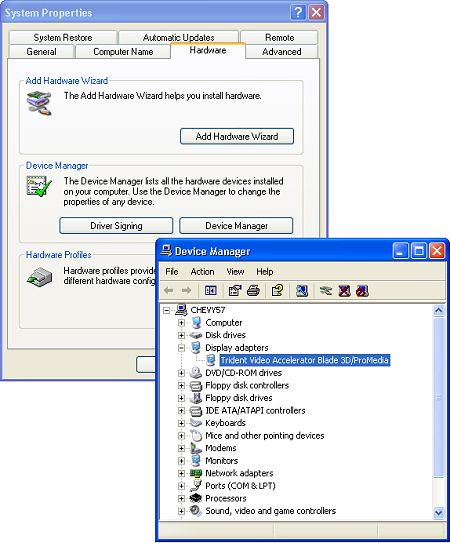
3. In the System Properties dialog box, select the Hardware tab and on the Hardware page, click on the Device Manager button to open the Device Manager dialog box.
4. In Device Manager, Click on the plus sign to expand Display Adapters, then double-click the video circuit's name to open its Properties dilaog box.
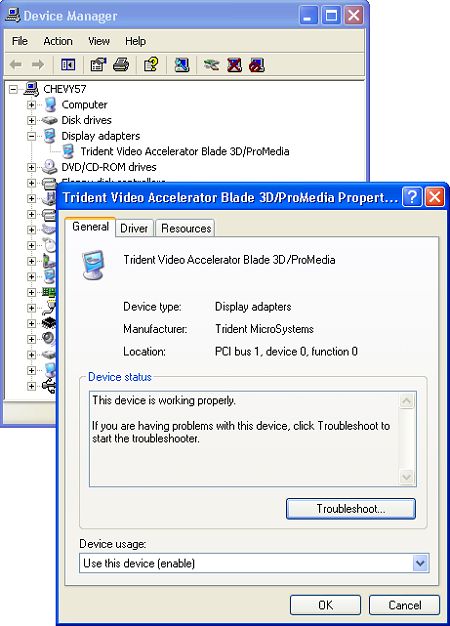
5. In the video adapter's Properties dialog box, select the General tab and on the General page, click on the Troubleshoot button to open the Video Display Troubleshooter.
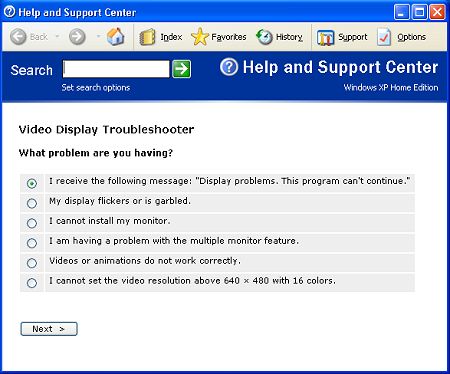
5. Follow the step-by-step instructions in the Video Display Troubleshooter.
The troubleshooter may advise you to Update, roll back, or uninstall the video circuit driver. This may require you to locate the original Windows CD, or the CD that came with your computer or video card that contains the drivers. You may also be able to downlaod a better video driver from the manufacturer's Web site.
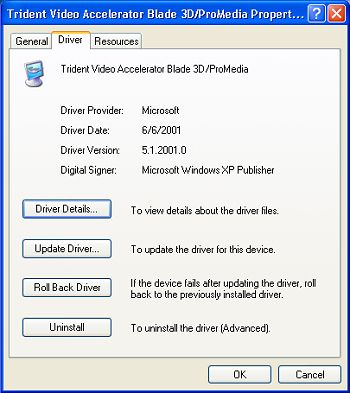
To Update, roll back, or uninstall the video adapter driver, in the video circuit's Properties dialog box, select the Driver tab and click on the appropriate button: Driver Details, Update Driver, Roll Back Driver, or Uninstall.
If you can't get video in normal mode, you may need to start the computer in Safe mode to troubleshoot the video driver.
• To start the computer in Safe mode, start the computer and when the message "Starting Windows" appears on the screen, immediately press the F8 key. In the Startup menu that appears, select Safe mode.
When you start the computer in Safe mode the operating system uses the default VGA mode provided by the VgaSave service.
If, in safe mode, you receive the error message: STOP B4 error, VIDEO_DRIVER_FAILED_TO_LOAD, then one of the following files could be missing is corrupted:
%SystemRoot%\System32\Vga.dll
%SystemRoot%\System32\Vga.drv
This error also occur if the VgaSave service is not set to SERVICE_SYSTEM_START.

More Windows Troubleshooting Articles:
• How to Fix msvcrt40.dll Error
• Troubleshooting Broadband Cable Modem Problems
• Examining Computer Hardware Components
• Windows Don't Start Because of a Corrupted Registry
• How To Fix AppHelp DLL Errors On Your PC
• Create Recovery Discs for Windows Vista with HP Recovery Manager
• Video - Dell Laptop Memory Replacement Tutorial
• Why Don't I Get Sound From My PC?
• Windows Takes Too Long to Start
• The Blue Screen of Death (BSOD)
