NTFS Reader for DOS works similar to the old DOS file managers. You use the [Tab], [Shift] + [Tab], and Arrow keys to navigate. You can get a directory / file listing of an NTFS formatted drive (in DOS 8 + 3 character file name format) and copy files from the NTFS drive to a FAT formatted drive.
Welcome to Bucaro TecHelp!

Welcome to Bucaro TecHelp!
Maintain Your Computer and Use it More Effectively
to Design a Web Site and Make Money on the Web

[About BTH]  [User Agreement]  [Privacy Policy]  [Site Map]  [Contact Form]  [Advertise on BTH]  [News Feed]

Google
Web
This Site

Free DOS Boot Floppy Reads NTFS

NTFS Reader for DOS is a free utility that creates a DOS boot floppy that can read NTFS formatted drives. This is something that you could use if you were unable to start Windows, not even in Safe mode, and you don't have access to, or don't care to deal with the Windows Recovery Console. In this type of crash situation, this might allow you to recover your data from an NTFS formatted drive.

To use NTFS Reader for DOS:

-  Your computer must have a working floppy drive installed, and the BIOS must be configured with the floppy as the first device in the boot order.

1. Download NtfsFloppySetup.exe from ntfs.com to a working computer's hard disk. (The 658 KB download fits on a floppy disk.)

2. Insert a blank formatted floppy disk in the drive and double-click on the downloaded file's name.
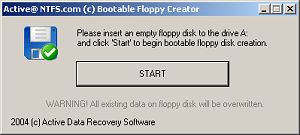
NTFS Reader for DOS dialog box

3. In the dialog box that appears, click on the [Start] button.

The NTFS Reader utility will write some DOS files to the floppy disk, including COMMAND.COM, AUTOEXEC.BAT, and READNTFS.EXE.

4. In the dialog box, click on the [Close] button.

5. With the floppy disk in the drive, restart the computer.
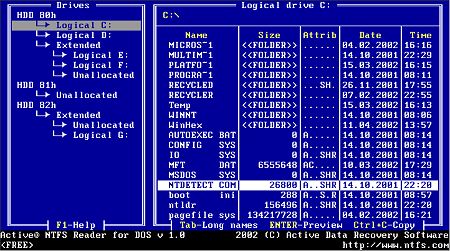
NTFS Reader utility

NTFS Reader for DOS works similar to the old DOS file managers. Use the [Tab], [Shift] + [Tab], and Arrow keys to navigate. It allows you to get a directory / file listing of an NTFS formatted drive (in DOS 8 + 3 character file name format) and copy files from the NTFS drive to a FAT formatted drive.

This free utility could be a life saver in a crash situation where you need to recover your data from NTFS formatted drive. If the NTFS drive is in such bad shape that you can read it with NTFS Reader for DOS, visit the ntfs.com web site for more information about data recovery, including how to fix a damaged Master Boot Record.

Computer Sections

RSS Feed RSS Feed


Click Here! Free PC Technical Support
Windows Troubleshooting
Microsoft's Support Websites
Computer and Component Manufacturers Support Links
Free Online Antivirus Scanners
What Should be in a PC Technician’s Tool kit?
Static Discharge Causes Flaky Damage
Windows Startup Modes for Troubleshooting
The System Information Utility
Diagnose a PC's Multimedia Functions
A Quality Freeware Hardware Diagnostic Tool
Free Detailed PC Analysis
Free Online PC Diagnostic Tests
A FREE RAM Diagnostic Tool
Troubleshoot Windows XP with Free Upgrade Advisor
Get Remote Technical Assistance
Troubleshooting a Dead Computer
A lot of Beepen and Tooten But No Booten?
Hard Drive Does Not Boot
Windows Don't Start Because of a Corrupted Registry
How to Create a Windows XP Boot Disk
Free DOS Boot Floppy Reads NTFS
How to Reinstall Windows XP
The Blue Screen of Death (BSOD)
Understanding the boot.ini File
How to Fix Overheating Computer
Windows Takes Too Long to Start
Windows Doesn’t Shut Down
Your Computer Can't Keep Time
A Required DLL Was Not Found
Troubleshooting DLL Problems
When Pesky Programs Won't Go Away
Fix System Information "Can’t Collect Information" Error
Can't Boot From CD or DVD Drive
Fix CD Writer Buffer Underrun Errors
Problems with Floppy Disks
How to Tame Your Mouse
How to Troubleshoot Your Computer's Mouse
No Computer Sound
Slow Log-on to ISP
How To Troubleshoot Video Display Problems
Printer Troubleshooting
Solving Image Problems on HP Laser Printers
Stop Hard Disk Thrashing
How to Recognize and Repair Power Supply Problems
How To Repair Hard Drive Problems
CD-ROM Problems
Buffer Underrun and Overrun Scenarios
How to Resolve Cable, DSL, and Dialup Modem Problems
How to Troubleshoot the Video Driver
Run Old Programs in Windows Vista
Troubleshooting Computer Freeze (Lockup) Problems
What's With All Those Error Messages?
View Hidden Devices with Device Manager
Troubleshoot Windows with Task Manager
Troubleshoot Windows with Event Viewer
Windows XP's Built-in Help and Support Center
The Windows Recovery Console
System Restore: The Big Undo
How to Fix Windows XP Errors
Create Recovery Discs for Windows Vista with HP Recovery Manager

[Site User Agreement]  [Advertise on This site]  [Search This Site]  [Contact Form]
Copyright©2001-2007 Bucaro TecHelp P.O.Box 18952 Fountain Hills, AZ 85269