
When the Windows operating system encounters a situation where it can't continue, or where continuing might lead to data corruption, it comes to a screeching halt and displays an incomprehensible error message on a screen with a blue background. This situation is referred to as "The Blue Screen of Death" (BSOD).
What can cause the Blue Screen of Death? The most common cause of the BSOD is a memory or a storage device read or write error. It could be an inability to read memory or a storage device. It could be bad data retrieved from a memory or a storage device, or it could be a program or service attempting to read from or write to a location in memory or a storage device that it is not authorized to access.
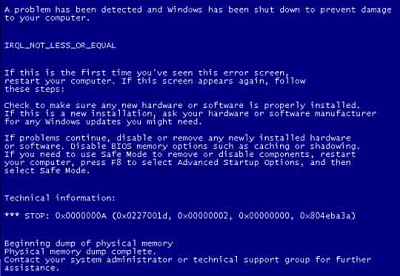
A BSOD will usually provide you with some cryptic information about the error, including its symbolic name and a stop code. For example:
DATA_BUS_ERROR Stop 0x0000002E
This indicates that Windows has detected a parity error in system memory. In other words, bad data was retrieved from a memory or a storage device. Parity refers to an error checking scheme where a bit in each byte is set to an 0 or 1 so that each byte has an even number of ones (or in the case of odd parity, an add number of ones). If the number of ones in a byte read from a memory or a storage device does not match with the parity scheme, it indicates an error.
KMODE_EXCEPTION_NOT_HANDLED stop 0x0000001E
The error shown above indicates that the processor tried to execute an illegal or unknown instruction.
If you're familiar with Windows virtual memory scheme, you know that the operating system is able to pretend like it has much more memory than the amount of installed RAM by using part of the hard disk as virtual memory. Blocks of data and program code are shifted in and out of virtual memory in block sizes called pages. The file on the hard disk that they are stored in is called the page file.
PAGE_FAULT_IN_NONPAGED_AREA Stop 0x00000050
The error shown above indicates that Windows encountered an error in an area of system RAM that was not paged into virtual memory.
KERNEL_STACK_INPAGE_ERROR Stop 0x00000077
The error shown above indicates that Windows attempted to store a page of memory into virtual memory, but was unsuccessful.
KERNEL_DATA_INPAGE_ERROR Stop 0x0000007A
The error shown above indicates that Windows attempted to read a page of memory from virtual memory, but was unsuccessful.
What is the most common cause of a memory or a storage device read or write error? Similar to general troubleshooting, you have to suspect the last thing that was changed on the computer. Was new software installed or updated? Was a new device driver installed? Standard procedure in troubleshooting is to first back out of the last change made to the computer. That's why Windows is designed to save Restore Points.
Memory or storage device read or write errors can be caused by a hard drive that is starting to fail, or a memory chip that is not running up to specification or that has an unreliable storage cell. Read or write errors can also be caused by electrically noisy power from an inadequate power supply or a power supply that is starting to fail. Errors can be caused by damage to a motherboard caused by a technician that worked on the computer without proper anti-static protection.
Another thing that can cause read or write errors is an AC power line that is not surge suppressed. If your building has a high-power device, like a large compressor motor, it can induce spikes on the AC power line that might make it through the computers power supply to cause electrical noise during a read or write operation.
With today's computer cases being made with more plastic and less metal, it's not that far-fetched for a cosmic ray to penetrate the case and hit a memory cell, changing its data content. That's why if you rarely receive the Blue Screen of Death, it's probably best to just try re-booting the computer.
Many times, the BSOD screen itself will provide recommended user action. It may recommend disabling or replacing a driver, checking how much free disk space the computer has, or it may recommend simply rebooting. It may tell you where to connect a kernel debugger, or where a memory dump file was saved, if you have the expertise to use one.
There are hundreds more BSOD stop codes than those listed here. You can do a search on google or at Microsoft's technet website for your specific error message. Or if you have the money you can contact Microsoft Support and open a support ticket, but first, you may want to make sure someone hasn't installed the Blue Screen of Death screen saver.

More Windows Troubleshooting Articles:
• Troubleshooting Laptop Power Issues
• Can't Detect a Hardware Device? - Try Resetting BIOS
• How to Fix Aclui Errors
• How to Troubleshoot, Dissemble, and Repair a Laptop Display
• Free Firewall - ZoneAlarm
• Examining Computer Hardware Components
• How to Troubleshoot and Fix No Sound
• Windows 7 Startup Repair Tool
• How to Troubleshoot Your Computer's Mouse
• Troubleshoot Windows XP with Free Upgrade Advisor
