
As you know, all physical objects are made of atoms. In the middle of an atom is a nucleus. Orbiting around the nucleus are negatively charged electrons. As you move about, possibly walking across a rug, friction causes electrons to rub off the rug and other objects and onto you. A static charge builds up on you.
The voltage level on you from the build-up of electrons can be 20,000 volts or more. Remember from science class "like charges that repel each other", so if you move near an object that has a more neutral charge, the electrons will jump from you to the more neutral object. This movement appears as a spark that is referred to as electrostatic discharge.
Integrated circuits on printed circuit boards inside a PC are susceptible to damage by electrostatic discharge. So if you handle integrated circuits, printed circuit boards, or attempt to place your hands inside a PC's case without proper ESD protection, you can cause damage. If you totally destroy some electronics (referred to as catastrophic failure), count yourself lucky.
The problem is that you may not see a visible spark. You may not know that a static discharge occurred. When a device that is exposed to an ESD is only partially damaged and appears to work (referred to as a latent defect) it can produce occasional or frequent errors. This is what technicians call "flaky" because the failure does not occur reliably enough to be able to track it down.
One way to avoid an ESD while working on a PC is to leave the computer plugged into the AC outlet with the computers power switch off. This places ground on the computers metal case. Then the technician works with one hand always on a metal part of the case. Any electrical charge that builds up on your body is then immediately conducted to ground.
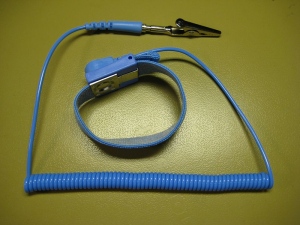
The proper way to handle computer circuits is to wear a grounded wrist strap. Wrap wrist end of the strap firmly around your wrist and secure it with whatever mechanism it has to create a snug fit. Attach the other end of the strap, usually with an alligator clip, to a bare metal part of chassis. Any electrical charge that builds up on your body is then immediately conducted through the strap to ground.
There is some debate on weather you should leave the system's power cord plugged in to the AC outlet or not. Some say you need to have it plugged in to provide an earth ground. Others say it's too dangerous to leave the system's power cord plugged in to the AC outlet while working inside the case. Since they are all newbies compared to me, I'll tell you the actual truth.
If you're working on a desktop computer, you don't really need the system's power cord plugged in to the AC outlet while working inside the case, the metal chassis is quite massive enough to absorb any ESD. If you're working inside a laptop however, the metal chassis may too flimsy to absorb a powerful ESD, the laptop should have its power cord plugged in to the AC outlet while working inside the case. However, never put your hands inside a desktop or laptop computer's case with the power turned on.
As general advice from someone who's worked on tens of thousands of electronic devices (yes, I've worked as a technician in a production environment), I've received thousands of electric shocks from 110 volts to 440 volts, and I'm still here to talk about it (although 440 volts can have a nasty bite). Different people have different skin conductivities. If you have dry skin, you'll find electricity can't hurt you much. If you have sweaty skin, your skin will conduct more, therefore you need to be more wary and take greater precautions.
If you service PC's on a regular basis, or if you work in a repair shop, you should have an antistatic mat either on the bench surface, on the floor in front of the bench, or both. The mat should be conductive and should have a cord which must be connected to an earth ground source (like the metal shell of an electrical box or a water pipe) and it should have several connections for wrist straps.
If you work in a repair shop, you can make the shop a less hazardous environment in regards to ESD by eliminating any carpeting and increasing the humidity. The important thing is to take ESD protection seriously so your company can avoid those costly and time consuming latent defects.

More Windows Troubleshooting Articles:
• Stop Windows Freezing and System Lockups
• A Required DLL Was Not Found
• How to Fix CD-ROM Redirector Error
• Free Detailed PC Analysis
• How to Fix logoncli.dll Error
• The Blue Screen of Death (BSOD)
• Five Tips for Troubleshooting and Fixing DLL Errors
• A lot of Beepen and Tooten But No Booten?
• Windows 7 System Recovery Options
• How to Fix No Sound in Windows 7
