
Nowadays CD and DVD discs are a very popular media for storing files, images, music and video. The problem is a small scratch from careless handling can result in a failure to read the information recorded on the disc.
CD Recovery Toolbox is a free tool developed by OEMailRecovery.com for recovering files from a damaged CD, DVD,HD DVD, or Blu-Ray Disc. The damage may be mechanical like scratches, chips, different spots on the surface, or it may have been caused a result of incorrect recording.
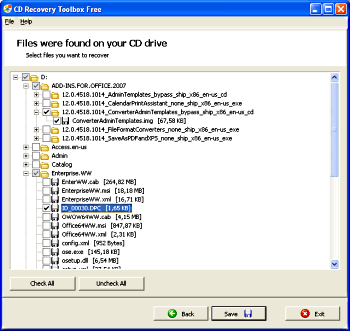
The CD Recovery Toolbox works in Windows 98, ME, NT 4.0, 2000, XP, and Vista. It not only has a complete set of data recovery features, but is also user-friendly and convenient. The program interface is designed as a step-by step wizard, where the user has to perform a single action on each page of the wizard. The wizard makes the use of the tool very simple and convenient even for a beginner.
CD Recovery Toolbox scans any CD and DVD disc and finds files and folders located there. It can recover files larger than 4 Gb. It checks for sufficient free space on the hard disk for storing the recovered files.
Depending on the degree of the damage, there can be some information on the disc that cannot be recovered. CD Recovery Toolbox shows a list of all files and folders available for recovery. The user then selects the files and folders to be recovered. Therefore, it finds the maximum possible amount of information that can be recovered.
To download this free tool go to Recovery Toolbox and scroll down to the [Download] button.
Learn more at amazon.com
More Windows Troubleshooting Articles:
• Windows Takes Too Long to Start
• How To Fix AppHelp DLL Errors On Your PC
• How to Troubleshoot the Video Driver
• Is Your Laptop Overheating? - 12 Tips To Prevent Overheating
• Make a Bootable Windows 7 USB Drive
• How to Fix Hard Drive Errors and Slowdown
• Troubleshooting Windows 10 DHCP is not enabled
• Troubleshooting Computer Freeze (Lockup) Problems
• Video - Exploring with Process Explorer
• Troubleshoot Windows 7 with Problem Steps Recorder
