
Windows Reliability Monitor, available in Windows 7 and Vista, is a built-in utility that analyzes your PC's event logs and provides a graphical display. To open Reliability Monitor, in Control Panel, click on the System and Security group link. On the System and Security page, click on Action Center. In Action Center, just to right of "Maintenance" click on the down arrow to view all the options. Click on the link "View reliability history" link.
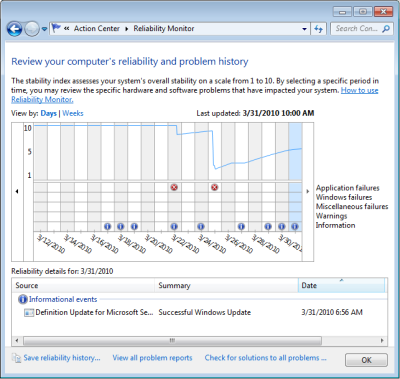
In the Reliability Monitor chart, the top line represents a "stability index". It's basically a 1 to 10 score of your systems reliability. If the line drops suddenly, there is a problem with your system.
The lower part of the chart displays five rows that track events that affect the relaibility of system, Application failures, Windows failures, Miscellaneous failures, Warnings, and Information. The (i) information icon indicates that a successful event occurred. The red (x) error icon indicates a failure occurred. Click on one of the icons and more detailed information will appear in the Reliability details box at the bottom of the page.
If you click on an (x), a list of the events related to the error will appear in the Relaibility details box at the bottom of the page. Select an item in the list and, in the "Action" column click on "Check for a solution". A message box will appear with some nonsense information.
For example, I clicked on the very common event "Internet Explorer stopped responding" and got some useless information. It should have displayed the message "Use Mozilla Firefox instead of Internet Explorer", that's the solution I used.
The columns in Reliability Monitor chart represent the time-line. You can click on the link in the upper-left corner of the chart to view either by Days or Weeks. The small arrows on the left and right sides of the chart allow you to scroll through time.
Reliability Monitor may not be adept at providing solutions, but it does provide a convenient chart of Windows events and some information to help identify the cause of an error.

More Windows Troubleshooting Articles:
• How to Troubleshoot Your Computer's Mouse
• How to Fix No Mouse Pointer Problem
• How to Spot a Failing Hard Drive
• System Restore: The Big Undo
• Free DOS Boot Floppy Reads NTFS
• Windows 7 Startup Repair Tool
• How to Resolve Windows 7 BOOTMGR Missing Error
• Fixing a Broken Laptop Screen Yourself is Easier Than You Think
• How to Fix logoncli.dll Error
• Undoing a Windows Update
