

Because of Windows XP's vulnerability to attack by viruses such as MyDoom, NetSky, Bagle, and Zafi, Microsoft released the Service Pack 2 (SP2) patch. SP2 added a firewall to the operating system. Actually SP1 had a firewall, but it was not as good as the one in SP2 and it was turned off by default. SP2 turns the firewall on by default.
However, if your PC is running Windows XP Service Pack 2, the first thing you need to do is turn off the firewall. Why? Because a serious firewall blocks unwanted inbound and OUTBOUND connections. SP2's firewall does not block unwanted outbound connections.
Why do you want to block outbound connections? Because spyware collects information from your PC and sends it back to the spyware's creator. You need to block these unwanted outbound connections. Since it's not recommended that you run two firewalls simultaneously, you need to turn off SP2's firewall and install a serious firewall like ZoneAlarm (free for home users).
Note: If you intend to download ZoneAlarm from the Web, you probably want to download the 6.36 MB self extracting file from ZoneLabs website first before turning off Windows firewall.
The following steps describe how to turn off Windows XP SP2's built-in firewall.
1. Select Start | Control Panel to open the Control Panel.
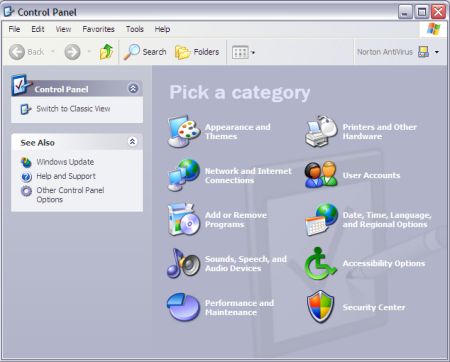
2. On Control Panel's "Pick a category" screen, open the "Security Center".
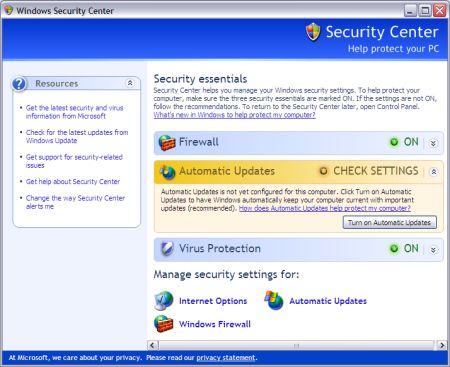
3. In "Windows Security Center", in the Manage Security Settings for: section, click on "Windows Firewall".
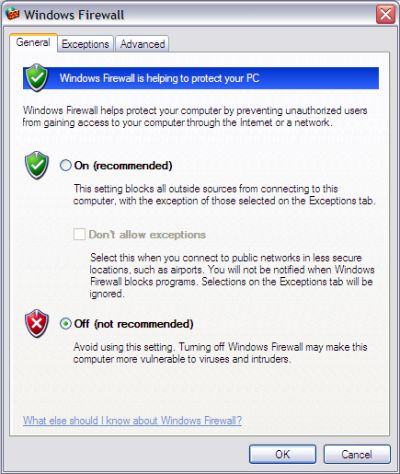
4. In the "Windows Firewall" dialog box, on the "General Tab", set the radio button next to Off (not recommended). Click on the OK button.
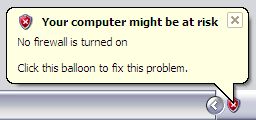
The popup message Your computer might be at risk will appear.
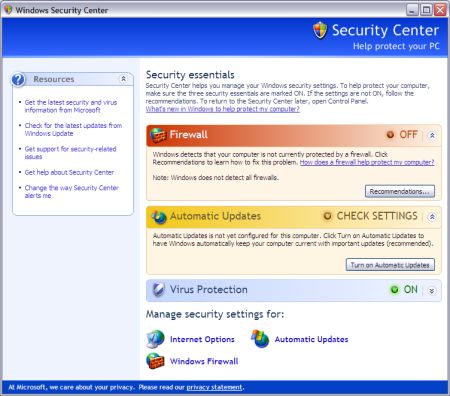
5. In "Windows Security Center", in the "Firewall" section, click on the Recommendations... button.
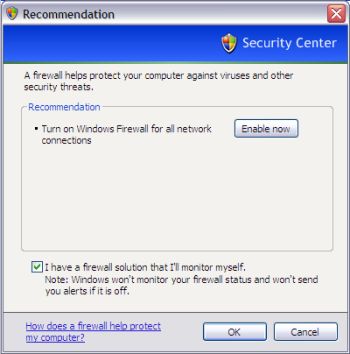
6. On the "Recommendation" page, set the checkbox next to I have a firewall solution that I'll monitor myself. Click on the OK button.
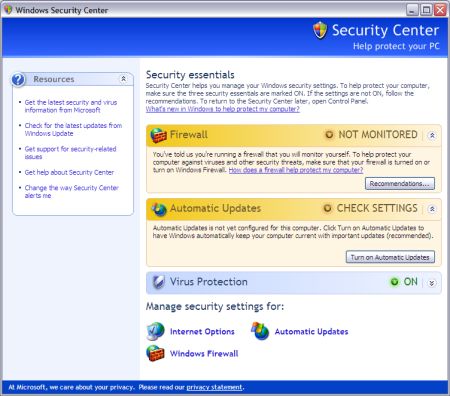
The "Windows Security Center" Firewall section displays the message "You've told us you're running a firewall that you will monitor yourself..." Close the "Windows Security Center".
Now you're ready to install a serious firewall on your PC. The most popular firewall is ZoneAlarm (free for home users).


More Windows Administration Information:
• What is Hyper-V in Windows Server 2019?
• PC Technician Certifications and Professional Organizations
• Video Tutorial 3 - The Windows 7 Backup and Restore Utility
• Uninstall OneNote from Windows 10
• Computer Technician's Guide to Dealing with Customers
• PowerShell Script to Show Last 5 Errors in Event Log
• What is Windows Aero and Mouse Gestures?
• Use Windows 10 File History Option to Backup Your Personal Files
• Windows PC Performance Troubleshooting and Optimisation
• PC Technician's Software Copyright Responsibilities